
Dispiriting mortgages, and disproportionate columns
A chart in a recent article in the Listener likely caught the attention of people hoping to buy their first homes, and possibly their parents too. The column chart shows the average mortgage size for first-home buyers, using data from credit bureau Centrix. It is included in an article considering whether first-home buyers are ending up with larger mortgages because the Bank of Mum and Dad is drying up.
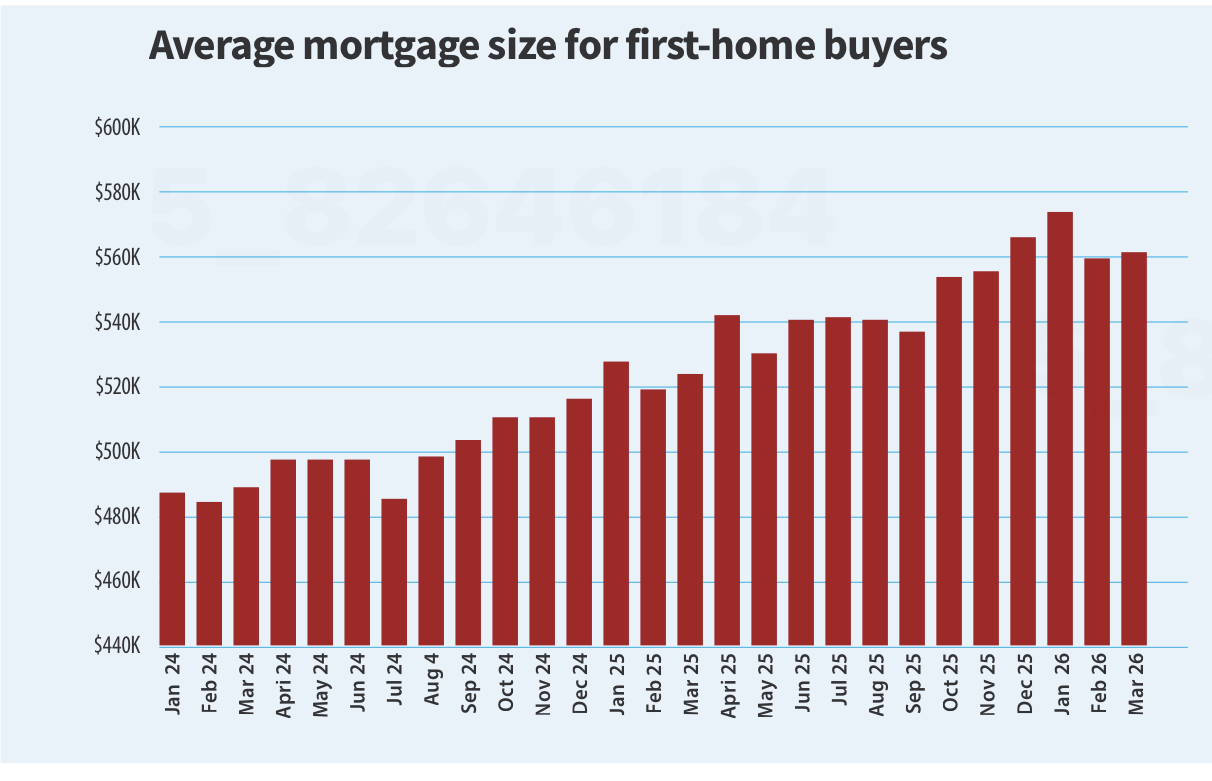
Bigger Mortgages by Eric Fryberg, New Zealand Listener, 3 October 2026, page 20. Reproduced for purposes of education, criticism and commentary.
The chart certainly makes the mortgages look bigger. The last column in the chart (March 2026) is about two and a half times as tall as the first column (January 2024). The values shown in the chart confirm that first-home buyers are borrowing more; however, the difference in the value of the average first-home buyer mortgage between January 2024 and March 2026 represents an increase of only about 15%.
This example offers three lessons that apply beyond housing: how the size of a change is shown, what it is compared with, and the source of the data.
Numerical axes should start at zero
The value of data visualisations stems from the ability of our brains to perceive patterns from pictures, so when the height of one column appears to be about two and a half times the height of another our brains quickly make the inference that whatever is being measured has more than doubled in size. In this case the axis begins at $440,000 and goes to $600,000, which makes the $74,000 difference between the value for January 2024 (about $487,000) and March 2026 (about $561,000) appear much larger than it really is even though the axis is clearly labelled, and the article text reports the values accurately.
Sometimes this happens by accident. Unfortunately, a lot of software defaults to showing only the range of an axis where there is a change. Other times those creating a data visualisation believe that showing just the portion of the axis where there has been a change will make it easier to see since starting the axis at zero would make the columns look much more similar. But the goal of a visualisation should be to leave the viewer with an accurate understanding of the situation the data represents. As in this situation, that often means a modest change in one direction or another rather than a dramatic one. Where seeing the detail is important, the actual values can be provided or the type of chart that incorporates a magnified pull-out can be used. Either of those options allows for the detail to be shown within its broader context, which will leave the viewer with a more accurate understanding.
Lesson: Don’t truncate numerical axes to show only the portion that changes during the period of interest. It distorts viewers’ perception of the magnitude of the change.
Add comparative data if it enhances understanding
Is a 15% increase in the average mortgage a lot? On its own, it is hard to say. If house prices had also risen 15% over the same period, bigger mortgages would be unremarkable — buyers’ share of equity in their homes would remain about the same.
In this case, the text of the article says: first-home buyers have been borrowing more at a time “when house prices have been flat or cheaper”. That contrast is the most interesting part of the story, yet it is not reflected in the chart.
Between January 2024 and March 2026, the national median sale price reported by REINZ rose from $760,000 to $788,000, an increase of about 4%. Interest.co.nz’s estimate of the average price paid by first-home buyers rose from about $657,000 to about $692,000, an increase of about 5%. A 15% rise in home loans against a 4–5% rise in house prices is a much more notable finding than a 15% rise in average mortgage values on its own.
A chart showing both series could have visually told the story of a closing gap between house prices and mortgages for first-home buyers. For example, data (from the same source, for reasons described in the following section) could have been shown by quarters, with columns in one colour showing average prices of houses purchased by first-home buyers and columns in another colour showing average mortgages for first-home buyers. Or alternatively it could have been a single data series showing the value of an average mortgage as a percentage of the value of an average house.
Lesson: Numbers become more meaningful when put into context by showing them in relationship to other important values or benchmarks.
Check whether the direction or magnitude of a conclusion depends on the source
There is a catch in the comparison above: the mortgage values and the house prices come from different sources.
Centrix is a credit bureau, and its mortgage figures come from the credit information lenders report to it. The Reserve Bank publishes its own monthly figures on new mortgage lending to first-home buyers, and the two don’t match. Using Reserve Bank data, first-home mortgages grew by about 7% (calculated from interest.co.nz figures for January 2024 and March 2026) over the time shown in the chart. Comparing that against the same 5% increase in average house prices for first-home buyers during that period implies slower closing of the gap between house prices and mortgages for first-home buyers.
The discrepancy between sources probably results from measurement differences in things such as how first-home buyers are identified, which loans are counted, and when. A sentence noting that Reserve Bank lending data show a smaller increase in the average size of first-home mortgages would have provided further evidence that there is indeed a closing gap while also signalling uncertainty about the magnitude of the gap.
Lesson: When reputable sources disagree, and the conclusion depends on which one you use, let the reader know.
The general gist of this part of the article — that the size of mortgages for first-home buyers is increasing — is interesting and true, if somewhat depressing for those first-home buyers, and potentially their parents. Artificially inflating their perception of the magnitude of that increase does not help tell that story more clearly. Adding comparative data about home values and alternative data sources would.
Everyone has off days
I often use data visualisation and communication appearing on the New York Times’ app and website to illustrate good aspects of data communication. NYT staff seem particularly skilled at making complex, data-intensive topics digestible. For example, they have created visualisations that crystallise the extent of climate change, and — perhaps most impressively — a podcast episode about pedestrian deaths that tells a data-intensive story without a single chart or table, but with the intrigue and suspense of a murder mystery.
In spite of this impressive track record, everyone has off days, and the New York Times itself had one recently on a day when it was trying to communicate about the stock market having an off day. That day (June 5th US time) I opened the New York Times app and saw the chart below. As shown there, the chart was in the main ‘today’ section of the app rather than the business or markets section.
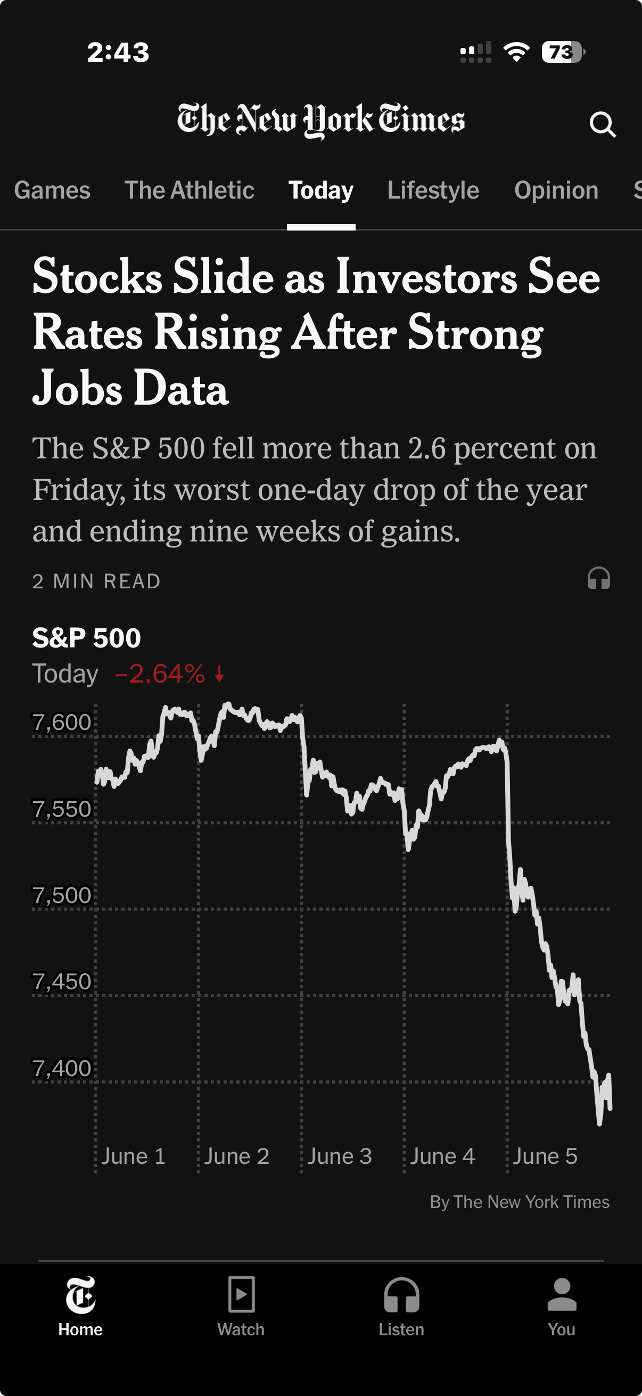
Image from the ‘today’ section of the New York Times iPhone app, 5 June 2026 (US time), reproduced for purposes of education, criticism and commentary.
Truncating axes magnifies differences
The headline describes stocks as sliding, and the graphic certainly appears to show quite a precipitous slide. But looking more closely, we can see that the axis shown only goes from about 7350 to 7650. If we look even more closely we can see the drop for the S&P 500 that day was 2.64%. That was certainly likely to be of interest, and potentially concern, to some investors, but it was a much smaller decrease than readers might have guessed looking at the graphic alone.
Generally speaking, truncating axes to exclude zero tends to magnify differences and make them appear larger than they actually are and it should therefore be avoided. That’s particularly the case because without zero there is nothing to anchor axes to and a chart the next day might use the same vertical distance to show a drop of 1.6% or a gain of 3.6%.
Those who truncate axes often intend to magnify differences, arguing that they are trying to show them clearly. For example, in this situation, they might say that starting the axis at zero and going up to 7650 or so (to include all of the data) would make the nearly 201 point drop in the S&P 500 on the 5th of June very hard to see. That’s a valid concern, but one with a better solution, as we’ll see in the next lesson.
Lesson: Include zero in axes when showing numeric data
Metric choice matters
If you asked a random sample of New York Times app users what 7,384 on the S&P 500 actually means my guess is that while many people would know it is a reflection of the collective value of large companies, few would know precisely what criteria are used for inclusion nor exactly how their value is combined into the value of the S&P on a given day. Therefore, a specific value on a given day, such as 7,384, is unlikely to mean much to them.
On the other hand, I would think most New York Times app users have a good understanding of what a 2.64% drop means. That raises a question: why don't the New York Times and others show day-to-day percentage changes rather than the index value itself? That would make it easier for people to distinguish noteworthy increases and decreases from normal day-to-day variations and long-term growth trends.
Lesson: Communicate data using the metric(s) that are most useful and intuitive to the intended target audience.
According to data from Macrotrends.net and a calculation by Claude, the S&P 500 dropped by at least 2.5% 22 times in the past five years. Showing the S&P chart as percentage changes in the New York Times app rather than the value of the S&P would have allowed viewers to see that while June 5th was a bad day in the financial markets, it wasn’t extremely uncommonly bad. Similarly, while the graphic shown by the New York Times that day wasn’t extremely uncommonly bad, it wasn’t their best data communication work either. Everyone has bad days. Even the S&P 500 and the New York Times.
Any way you slice it, data visualisation involves important choices
Data, and data visualisation, feel objective. It seems like any way you aggregate or disaggregate data, you should be able to answer the same questions and reach the same conclusions, right? Well, maybe not. Often, choices about how data is sliced, diced, and displayed really matter.
The way you slice data matters
Contrary to the old saying ‘any way you slice it…’, the way you disaggregate data does matter. Let’s see why using a visualisation published in the Post following the release of the most recent New Zealand budget. The sourcing for that says: ‘GRAPHICS: TREASURY’; however, while I could find the data shown on the Treasury website I could not find this exact visualisation, so it appears that journalists at the Post used the Treasury data to make their own visualisation.
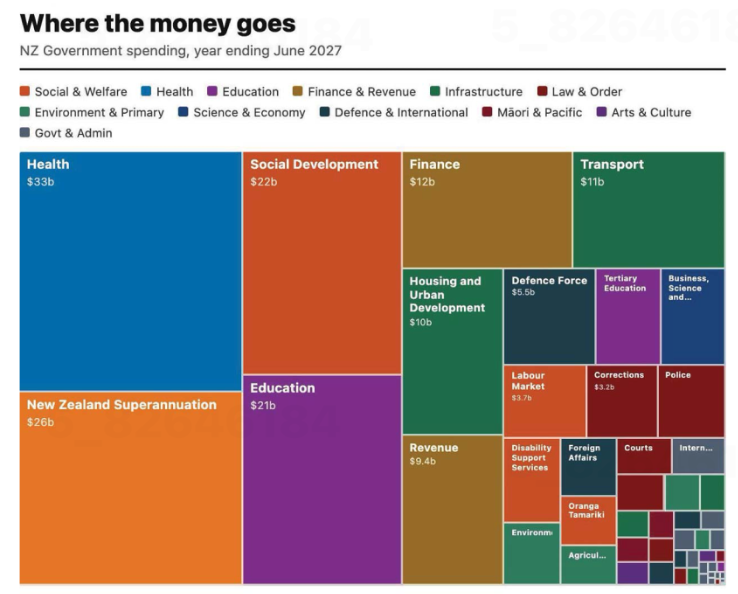
Image from page 17 of the Post, 29 May 2026, reproduced for purposes of education, criticism and commentary.
Let’s start our examination by acknowledging that communicating data about the budget for an entire country – even one as small as New Zealand – is hard. It involves sums of money that are difficult for most people to conceptualise — which makes choices about how to show it all the more important.
The visualisation is trying to communicate ‘where the money goes’ and does that by breaking spending down into categories, and colour coding those categories into larger groupings such as education and law and order. That all sounds reasonable, but you start to notice things when you look at individual rectangles within the treemap (more on this specific chart type soon).
As soon as we glance at the chart, our attention is likely to be drawn to the largest rectangle on the chart: health spending, shown in the top left corner. Looking more closely at the chart, we may then realise that is one of the only colour-coded categories that is represented by a single rectangle. Most others, such as education and law and order, are divided into more granular categories. For example, tertiary education is broken out from the rest of education, and law and order is broken down into police, courts, corrections and several other unlabelled rectangles.
There is no obvious reason for these choices, and they influence the questions you can answer using the chart as well as the conclusions you might draw from it. For example, you might want to know how much health spending goes to GPs versus specialists versus hospitals versus pharmaceuticals, but this chart would be of no help to you if you did. The dominant health box might also leave many viewers with the impression that more is spent on health than on anything else; however, adding up just the fully labelled social and welfare category rectangles — Social Development, New Zealand Superannuation, and Labour Market — quickly reveals that social and welfare spending is far greater than health spending, even before accounting for the smaller unlabelled or partially labelled rectangles in the social and welfare category.
To make it easy for people to quickly and easily get an accurate impression of data, it’s best to show it at a consistent level of granularity. For instance, RNZ showed 'how every dollar in the budget is spent' using one chart of the same type, with the data aggregated into high-level categories that allowed viewers to click on each major category to break it down into its component parts, so at any one time you were either seeing the high-level categories or the more granular categories for everything – not a mix of the two. That’s a more user-friendly way to communicate the same information.
Lesson: When showing different categories of things, aim for similar levels of granularity.
The way you combine and display data matters too
The issue just described is exacerbated by the fact that rectangles with the same colour coding are not combined together in the chart. If they were, it would give a better visual sense of how much of the budget each category represents collectively. Scattered all around, as the different categories are, it’s difficult for us to get a sense of that.
Beyond that, it’s worth questioning whether this type of chart is the best choice for communicating this data. The chart shown is a treemap. Like pie charts, stacked column charts, and stacked bar charts, it is intended to show proportions. However, all of those vary only on one dimension (the angle of each slice in a pie, the width of each slice of a stacked bar or height of each slice of a stacked column) whereas both the height and the width of rectangles in treemaps vary.
Furthermore, unlike stacked bars or columns, where every segment shares a common baseline, treemap rectangles are placed wherever they fit, meaning most pairs of rectangles share neither a common edge nor a common axis. That makes visual comparison between non-adjacent rectangles much harder — it's easier to compare education ($21b) to social development ($22b), since they share an edge, than to compare education to finance ($12b) or health ($33b) since those are not adjacent within the chart.
The combination of those two differences makes it harder for humans to visually compare two rectangles of a treemap and get an accurate intuitive sense of how they differ than it is for them to compare two slices of a pie chart, stacked bar, or stacked column.
Of course, the number of categories represented in this and many treemaps might be overwhelming in a stacked bar or column chart or a pie chart, but there are a number of ways to solve that problem. One is to use multiple charts, as described previously, first breaking things down at a high level, and then within sub-categories. Another is to use a non-stacked column or bar chart where each category has its own bar or column.
Lesson: Choose a chart type that fits not only the data, but also how humans naturally process information.
The charts from the Post and RNZ represent only a tiny portion of coverage of the budget. It attracts a great deal of commentary and conversation about the country’s financial commitments and priorities. A great chart can’t balance, or even stretch a nation’s budget, but any way you slice it, making good choices about how the underlying financial data is communicated to citizens and voters can make all that commentary and conversation better informed.
Good jokes, and good data communication, depend on the audience
Everyone knows that explaining a joke can wreck it. Over-explaining a data visualisation can have the same effect. The trick in both situations is that failing to explain can also sometimes be a problem. The skill is knowing which is which. Jokes often draw on things such as cultural references. An audience already familiar with the references will pick up on them and enjoy getting them. On the other hand, the same joke told to an audience with different cultural references (due to age, location, etc.) might fall completely flat. That second audience might either need some additional explanation or else a different joke.
The same type of audience awareness is important in data communication, though in that case what’s relevant is how knowledgeable the audience is about the domain or about data and analytics more generally. Previous posts have described the importance of making data communication accessible to general audiences that include people who are not particularly data-savvy, but what about the reverse? How do you tailor data communication to an audience with a relatively high level of data capabilities?
The strengths and weaknesses of bubble charts
A chart developed by The Economist and posted on LinkedIn provides a good illustration. They use a bubble chart to show the relationship between three characteristics of recent graduates in different fields of study: 1) how exposed the field is to AI, 2) the change in the percentage of graduates in full-time employment between 2022 and 2024, and 3) the number of graduates in that field.
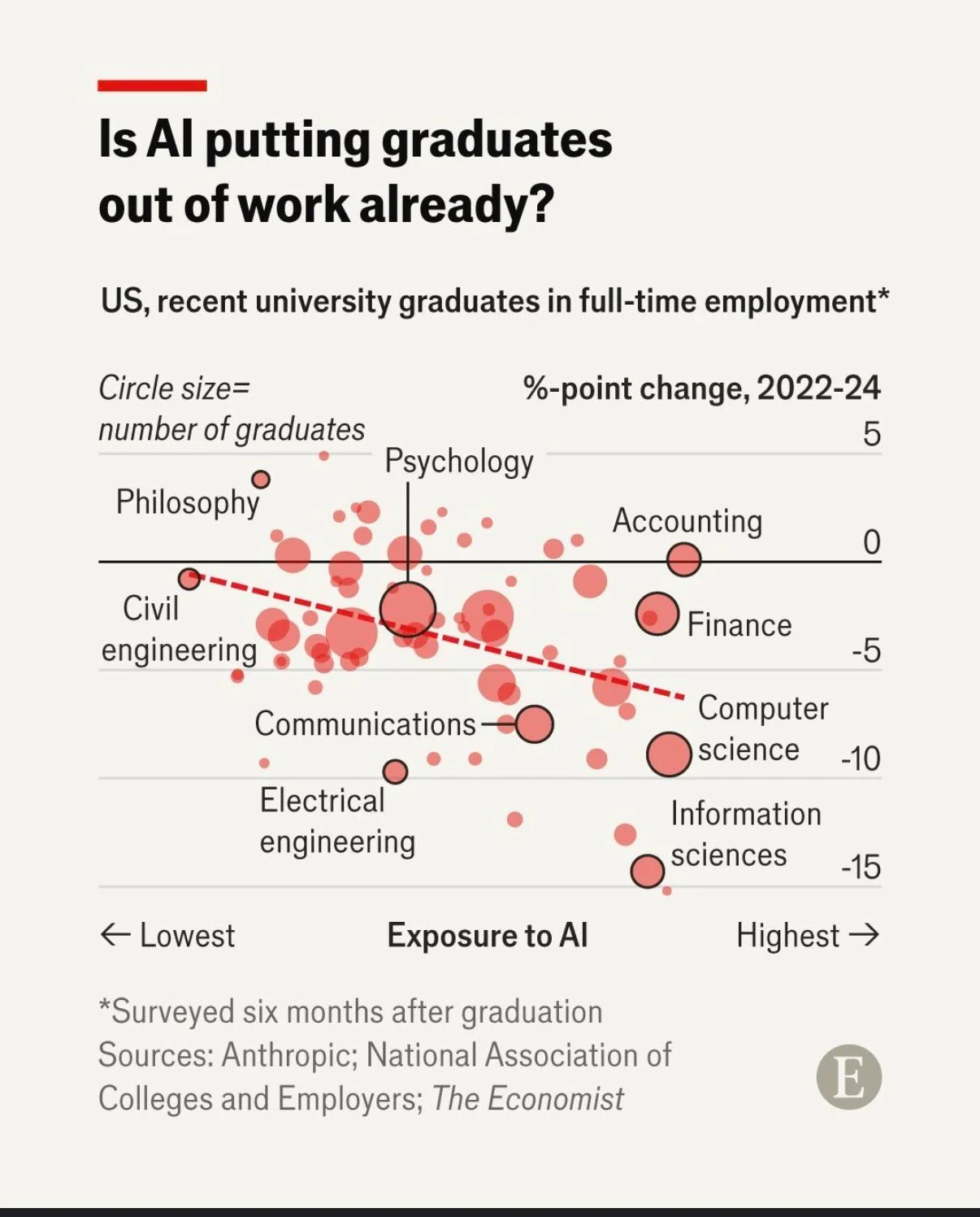
Image reproduced for purposes of education, criticism and commentary.
That packs a lot of information into a concise format for an audience that is comfortable with charts and graphs. Given the nature of the content it publishes, it seems safe to assume that includes most readers of The Economist and its LinkedIn followers. Such viewers are likely to be able to assimilate information about the three dimensions simultaneously.
In contrast, bubble charts can be very challenging for more general audiences to understand. Without a lot of explanation, and possibly a more gradual build-up, they may miss or misunderstand some of the information being communicated. The same is true of other more complex chart types, such as box and whisker or charts with two different y-axes.
Lesson: Complex chart types can reward data-savvy audiences but may confuse general ones.
To explain or not to explain
With its three dimensions’ worth of information, the Economist’s chart reveals interesting patterns with the help of some subtle cues. The solid black horizontal line separates fields in which more graduates were employed in 2024 than in 2022 (above the line) from fields in which fewer graduates were employed in 2024 than in 2022 (below the line). The downward sloping dashed red line shows the overall trend amongst all of the fields with the fields seeing the greatest drop in employment tending to be those that have the greatest exposure to AI. Scanning all of the bubbles with the help of those cues and the labels provided, we can see that computer and information science appear to be both among the most exposed to AI and among the fields that saw the greatest drop in employment of recent graduates between 2022 and 2024.
While all of that is interesting, the visualisation doesn’t say any of that, nor does the LinkedIn post in which it featured. The visualisation simply poses the question: ‘Is AI putting graduates out of work already?’ For a data-savvy audience, such as readers of The Economist, that creates an interesting puzzle to be solved. The chart gives them the information needed to solve it, and they have the skills to do so.
With a different audience, much more explanation would be needed to help them see how the chart answers the question posed. For example, they might not intuitively grasp the purpose of the dashed line or the meaning of the pattern of the bubbles. They also might not understand why the vertical axis shows the change in employment rather than just the employment rate.
You might be thinking: why not just explain everything all of the time? It does make sense to err on the side of explanation when you’re not sure about an audience, but too much explanation to an expert audience can easily come off as boring or condescending. It can also deprive them of the pleasure of finding the patterns themselves.
Lesson: More sophisticated audiences require less explanation.
This visualisation is a Good example of data communication for this audience — but with a different audience, the same chart could easily be Bad. Like knowing when not to explain a joke, knowing when not to explain a chart is a skill — and it starts with knowing your audience.
Little changes can make a big difference
On page 139 of his revered book ‘The Visual Display of Quantitative Information’, Edward Tufte says: ‘Multifunctional graphical elements, if designed with care and subtlety, can effectively display complex, multivariate data.’ Let’s consider charts Statistics New Zealand created to show immigration data to see how a bit more care and subtlety could improve the display of multivariate data in those examples.
Adding patterns can help show multiple dimensions
If you look at the first chart below, you can see that it is showing two different things: Whether people are arriving into or departing from New Zealand (also shown as the net difference between arrivals and departures), and whether or not the people arriving or departing are New Zealand citizens. Six different colours are used in the chart to show the combination of those two things.
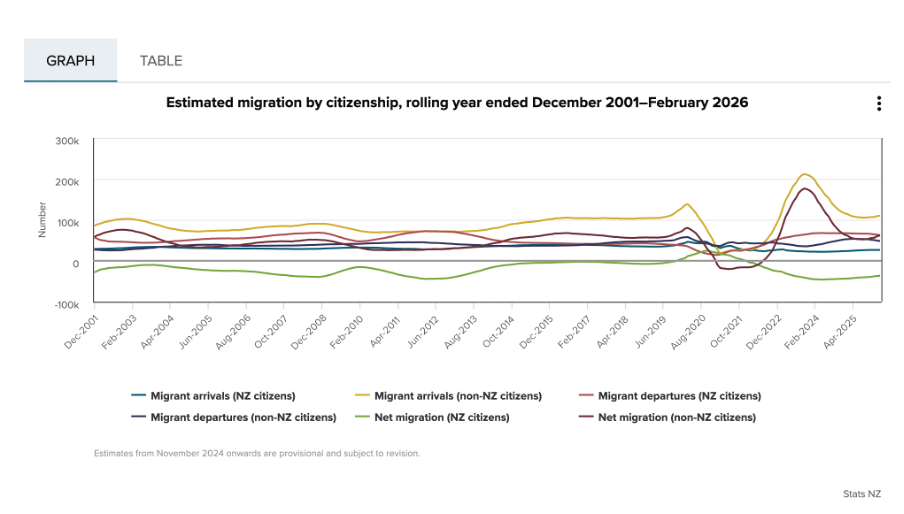
Image reproduced for purposes of education, criticism and commentary.
Since there is nothing particularly intuitive about the colours used, viewers of the chart need to repeatedly look back and forth between the legend and the line chart to remember which colour refers to which data series. This is exacerbated by the facts that: 1) different charts showing different immigration data on the same webpage use the same colours to show different things, as the chart below illustrates, and 2) all of the lines are fairly close together.
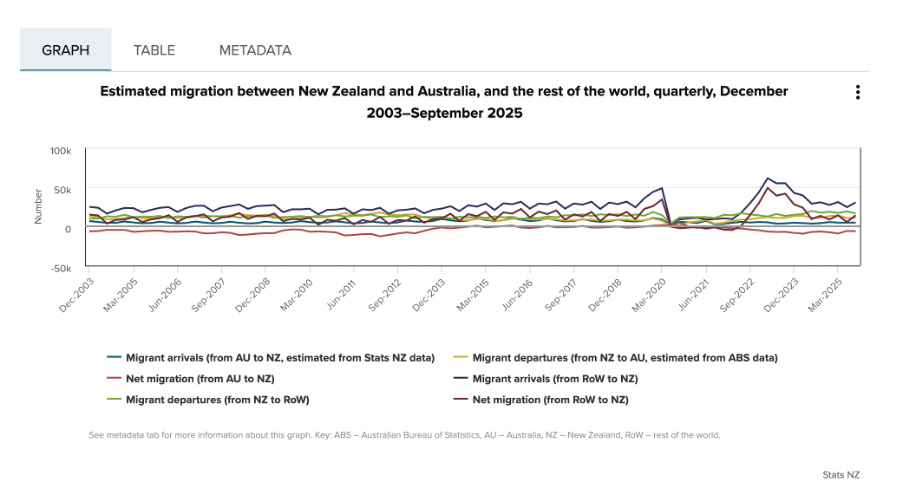
Image reproduced for purposes of education, criticism and commentary.
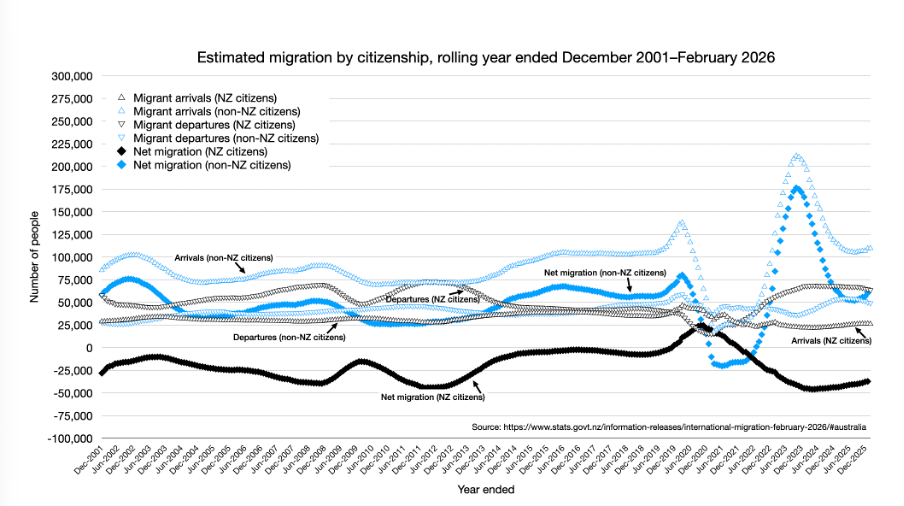
One way to use Tufte’s concept of multifunctional graphical elements would be to use different markers or symbols to convey one of the dimensions to make it easier for the viewer to distinguish between the different data series. In this situation, an obvious example would be to use up and down arrows or triangles to show arrivals and departures. That would then allow us to use one colour for New Zealand Citizens and another for non-citizens, which also helps make it easier for viewers to distinguish the different data series, as shown in the example below, remade with the data available after clicking on table tab in the top Statistics New Zealand chart.
Author's own chart, using Stats NZ data.
Lesson: Consider using patterns as well as colours to distinguish between different data series in charts — particularly when trying to show multiple dimensions.
Making choices about chart sizing using care and subtlety
The main plot area of the original Statistics New Zealand charts are quite short vertically, but relatively wide horizontally. The width is likely to be a function of the fact that there are a large number of data points to show (one for each month, showing rolling years). Since the charts are shown online, it’s not clear why so little space was allowed for the vertical dimension. Sometimes page sizes or layouts restrict the vertical dimension of a printed document, but that should be less of a concern online within reason.
Expanding the vertical dimension of the chart, as shown in the remade example above, makes it easier to distinguish between the different data series. Because it still uses the same numeric range, which includes zero, expanding the vertical dimension does not give a misleading sense of things like changes and differences — it just makes them easier to see. Part of the reason care is important here is that truncating the range of an axis, especially to exclude zero, can magnify things such as changes and differences and therefore be misleading.
Lesson: Changes to the size or dimensions of a chart may make it easier for viewers to see patterns in the data — just make sure it enhances those rather than distorting them.
Err on the side of labels
Another noteworthy bit of wisdom from ‘The Visual Display of Quantitative Information’ (page 180) is: ‘Words and pictures belong together. Viewers need the help that words can provide… It is nearly always helpful to write little messages on the plotting field to explain the data, to label outliers and interesting data points, to write equations and sometimes tables on the graphic itself, and to integrate the caption and legend into the design so that the eye is not required to dart back and forth between textual material and the graphic.’
As noted in that quote, labels can be very helpful, and if in doubt it’s prudent to err on the side of more labelling rather than less. For instance, in the remade chart above the up and down arrows or triangle symbols may be somewhat hard to see because there are a lot of them and some viewers may be using small screens, so the individual data series are labelled in situ as well as in the legend.
Lesson: Make sure axes, data series, and other elements within data visualisations and other forms of data communication are well-labelled to avoid ambiguity and confusion and to ensure viewers can focus on patterns and insights revealed in the data.
The Visual Display of Quantitative Information was published more than 40 years ago, yet it remains as relevant now as the day it was first printed. The need to ‘effectively display complex, multivariate data’ is as important now as it was then.
EVs are getting better all the time; so should data communication
Current geopolitics and associated oil and petrol prices have me feeling good about owning an EV. I bought mine a few years ago, and knew sales had dropped after incentives were removed in New Zealand, but I was curious to see if they had picked up again given current events. Anecdotal news reports suggest that they have, but it was harder than I expected to find the actual data.
Show your sources
After a bit of online searching, I found the dashboard shown below from Infometrics. The surge in EV registrations during the period of the Clean Car Discount is evident in the middle chart, as is the falloff after. I suspected the data came from the New Zealand Transport Agency (NZTA), as that’s the first place I checked myself (more on that later), but at first I could not verify that. Eventually I realised that the small red ‘i’ symbol under ‘Highlights for New Zealand’ was clickable and led to a list of data sources, but I had to search through that to find the one I was looking for and even then it just said NZTA without saying exactly where to find this specific NZTA data on their website.
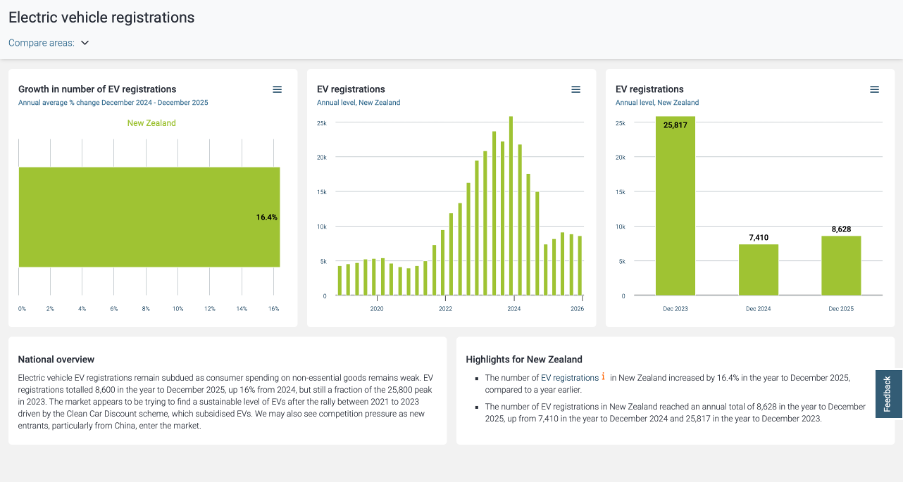
Image reproduced for purposes of education, criticism and commentary.
Not everyone wants to see sources, but some people do, and providing sources and making them easy to find adds to the credibility of your data communication. Sometimes it can be essential for viewers to really understand what they’re looking at. For instance, in this example, you may be wondering if plug-in hybrids are being counted within this dashboard or not. They were not, but the only way to know that for sure is to find and click the symbol and read that additional information about the source.
Lesson: Always show your sources, and make it easy for those who want them to find them.
Provide comparisons
While it’s clear from the last two charts that EV registrations dropped between 2023 and 2024 and from all three that EV registrations grew between 2024 and 2025, what’s not clear is how that compares to other types of vehicles. For example, during 2024 you often heard the mantra ‘survive until 2025’ reflecting the difficult economic times, so perhaps sales of all vehicles were down in 2024. Without comparative data, we can’t tell for sure.
While the second chart in the Infometrics dashboard is very helpful, the other two essentially just show the same information in different ways, and would have been usefully replaced by charts for hybrid and petrol only vehicles so we could compare and contrast registrations for each type of vehicle across time.
Lesson: A lot of data is most informative when shown in relationship to relevant comparative data.
Getting granularity right
The other thing that’s missing from the Infometrics dashboard is data for the first three months of 2026. Given the rapidly changing situation in the oil-rich Middle East, things might have changed a lot in the past few months, but we can’t tell from the Infometrics dashboard.
As I mentioned, I went to the NZTA website first because I recalled that they have their own dashboard, and that did indeed have data up through March 2026 and it did have comparative data for different types of vehicles, but it had different limitations from the Infometrics dashboard. Specifically, even after several attempts I was unable to get it to display data by month as opposed to showing it for one month or a group of months added up.
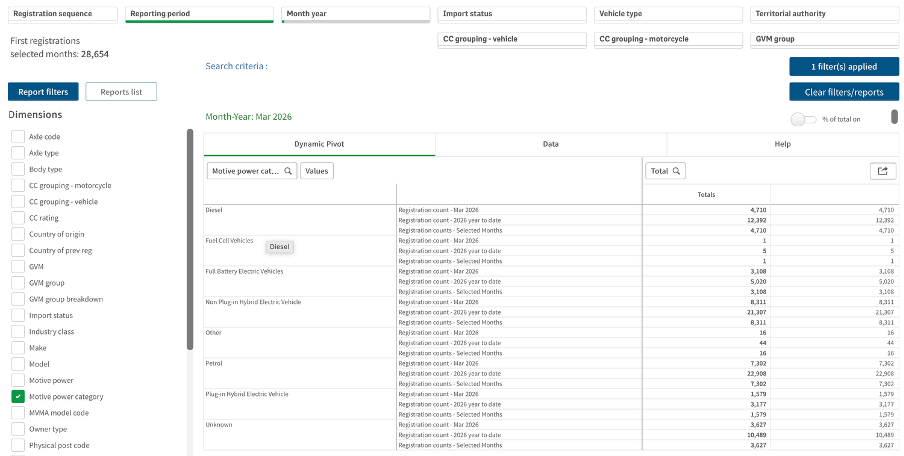
Image reproduced for purposes of education, criticism and commentary.
If I really needed to, I could have downloaded the data for January, February, and March 2026 one month at a time, but obviously that’s not the most user-friendly experience. In this situation, people making decisions about things such as whether to accelerate the roll-out of additional EV charging infrastructure probably want to know about any changes in trends sooner rather than later and therefore would have appreciated being able to access that more granular data without having to do a lot of their own manipulation of the data.
Lesson: Communicate data insights at the level of granularity that will be most useful for decision makers.
While I’m less concerned about current fuel prices and potential fuel shortages than owners of cars with combustion engines, my own EV from just a few years ago doesn’t go as far on a charge as the new ones being sold today. EV manufacturers didn’t get everything perfect on the first try. They needed to improve battery technologies and redesign car bodies to accommodate differences in things such as the weight distribution resulting from EVs having much larger batteries than internal combustion cars, but no engine.
It’s also hard to get data communication right the first time. Neither the Infometrics nor the NZTA dashboard is perfect or individually sufficient, but that same sort of patience to redesign and refine pays off in data communication, just as it has for modern EVs.
Get to the point
In one of the courses I teach for Wellington Uni-Professional, I have participants do an exercise where they critique an example of a data-intensive report (or other form of data communication) created by someone else. Over many iterations of the exercise, the most common negative critique relates to length. The examples are often reports that are hundreds of pages long, which are, unfortunately, extremely common in the New Zealand public sector. Participants rightly observe that few, if any, people are likely to want to wade through all of that and the length of the documents makes it hard for people to find the information they really want and potentially unlikely to even bother.
A recent information release from Statistics New Zealand illustrates the benefits of carefully curating data communications to focus on only what is essential and then to present that in a highly digestible way.
Less is more
In the course, we speculate about why the examples we are critiquing ended up being as long as they are. Theories typically include the authors erring on the side of including information just in case someone wants it, wanting to show all the analysis that they did, and not leaving enough time before a deadline to do a careful edit.
Whatever the reason, counter-intuitively, more information in a report, presentation or dashboard often leads to a worse experience for the reader or viewer. It makes it hard for them to find the information that they’re looking for and makes it more likely that they won’t try or will be unsuccessful even if somewhere, hidden in all of that material, are insights that would be very valuable to them.
Providing an overly long report or other form of data communication essentially outsources the curation and editing work to the reader or viewer when it should be the responsibility of the author. Statistics New Zealand’s Employment Indicators for February 2026 provides a good illustration of how concise a valuable data-intensive output can be when the authors take that responsibility seriously.
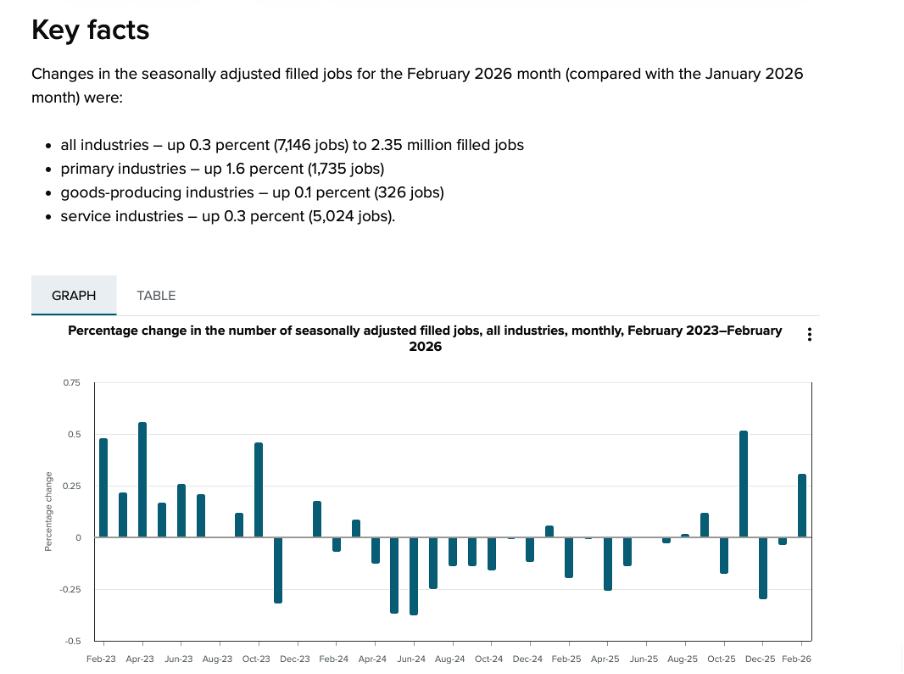
Image reproduced for purposes of education, criticism and commentary.
In just a page or two’s worth of words and numbers it provides a quick overview of changes in the number of filled jobs in New Zealand over time (as shown above), and breaks down changes by industry, region, gender, and age over the previous month (as shown below). It also shows changes in jobs as both a percentage and an actual number of jobs. That’s enough for most people to gain a clear understanding of recent trends in the job market for a very small investment in time.
Lesson: Carefully consider what information is essential and provide only that.
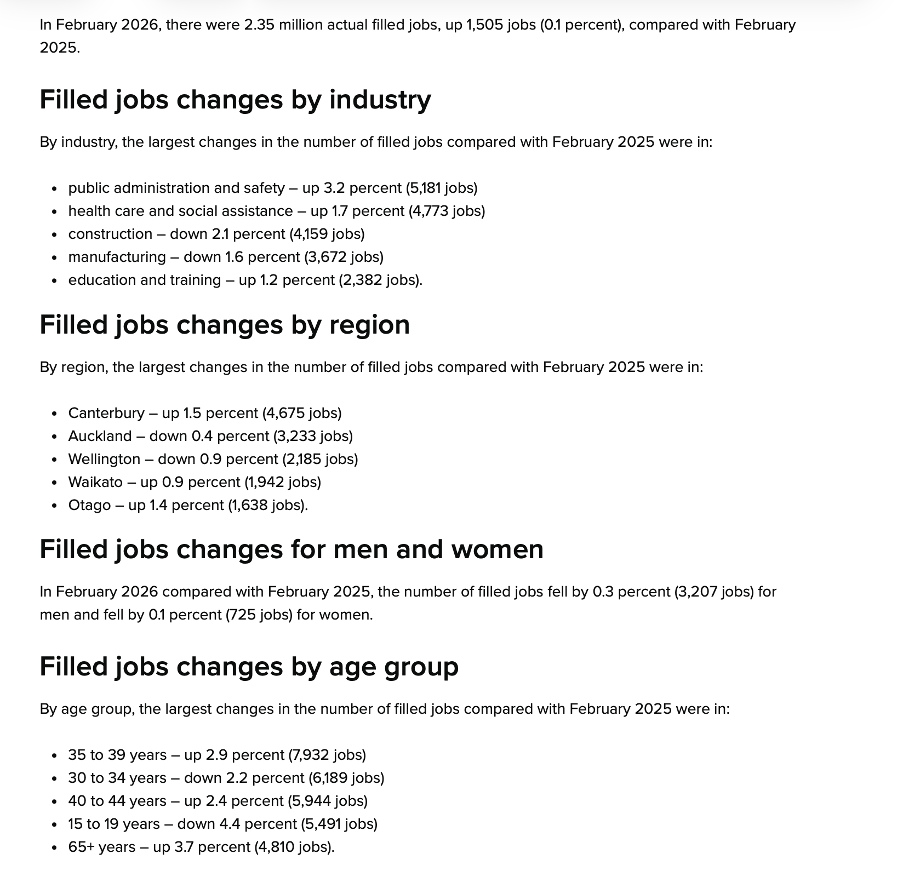
Image reproduced for purposes of education, criticism and commentary.
Start general then move to specifics
In addition to providing a good illustration of carefully pruning back to the most essential information, the Statistics New Zealand example also demonstrates a general pattern for how to summarise information well, and that is to start at a high-level of aggregation and then break things down into more granular detail.
In this example, that means starting with the percentage change in total filled jobs by month and then subsequently showing changes in the prior month by industry, region, gender, and age. Starting with that high-level view lets readers or viewers orient themselves first and then see how specific industries, regions, or groups vary from broader trends (such as the relatively large drop in jobs filled by 15-19 year olds in this instance). It also means that someone who only cares about the high-level view can stop once they’ve seen that.
Lesson: Start with the high-level view, then break things down into greater detail.
What are my options?
While many people may only want the high-level view, and most will be very pleased with a concise, well-curated version of the story you are telling with data, some may want additional information. That might include additional methodological detail, even more granular cuts of the data, or to see data in an alternative format.
As the Statistics New Zealand example shows, in today’s environment it’s easy to give readers and viewers the option of accessing that type of information via links to additional details, data, and information. In this situation, that includes links to download the actual data, to see definitions and metadata, and to show the time series data as a table rather than a chart.
This approach is convenient for people who, for example, may want to download data to do their own analysis rather than just looking at it, people who want to better understand particular aspects of how data was collected and analysed, and for those using technologies designed to aid accessibility.
Lesson: Provide options to access more information or alternative forms of the same information.
We’re living in a time when attention is at a premium, and it’s important to reflect that in the data products that we create. Take a little extra time to carefully curate your data communications to make sure that they contain only the most essential information, begin with higher-level insights then move to more granular ones, and give users who want more detail options for getting it. If you do, your report, presentation, or dashboard may end up being one of the positively critiqued examples in my classes or in this blog.
Precisely what do you mean?
John Maynard Keynes is reported to have said: "It is better to be roughly right than precisely wrong." When it comes to data communication, we can think about roughly the impression we want readers or viewers to come away with as well as the precision with which we report individual results, and consider how those two things go together.
Health New Zealand recently published some data in several New Zealand newspapers that we can use to consider those ideas. We might describe the overall effect of that example as roughly wrong and precisely right.
Show me the big picture
The largest numbers in the visualisation are the national percentages for each metric and under each one of those is an upward arrow showing the percentage improvement from the same quarter of the previous year. Since all of those arrows are pointing up, if you quickly glanced at the visualisation it might leave you with the impression that everything is going great. The ‘Delivering better healthcare for you’ headline above the visualisation and description of improvements below would probably reinforce that impression.
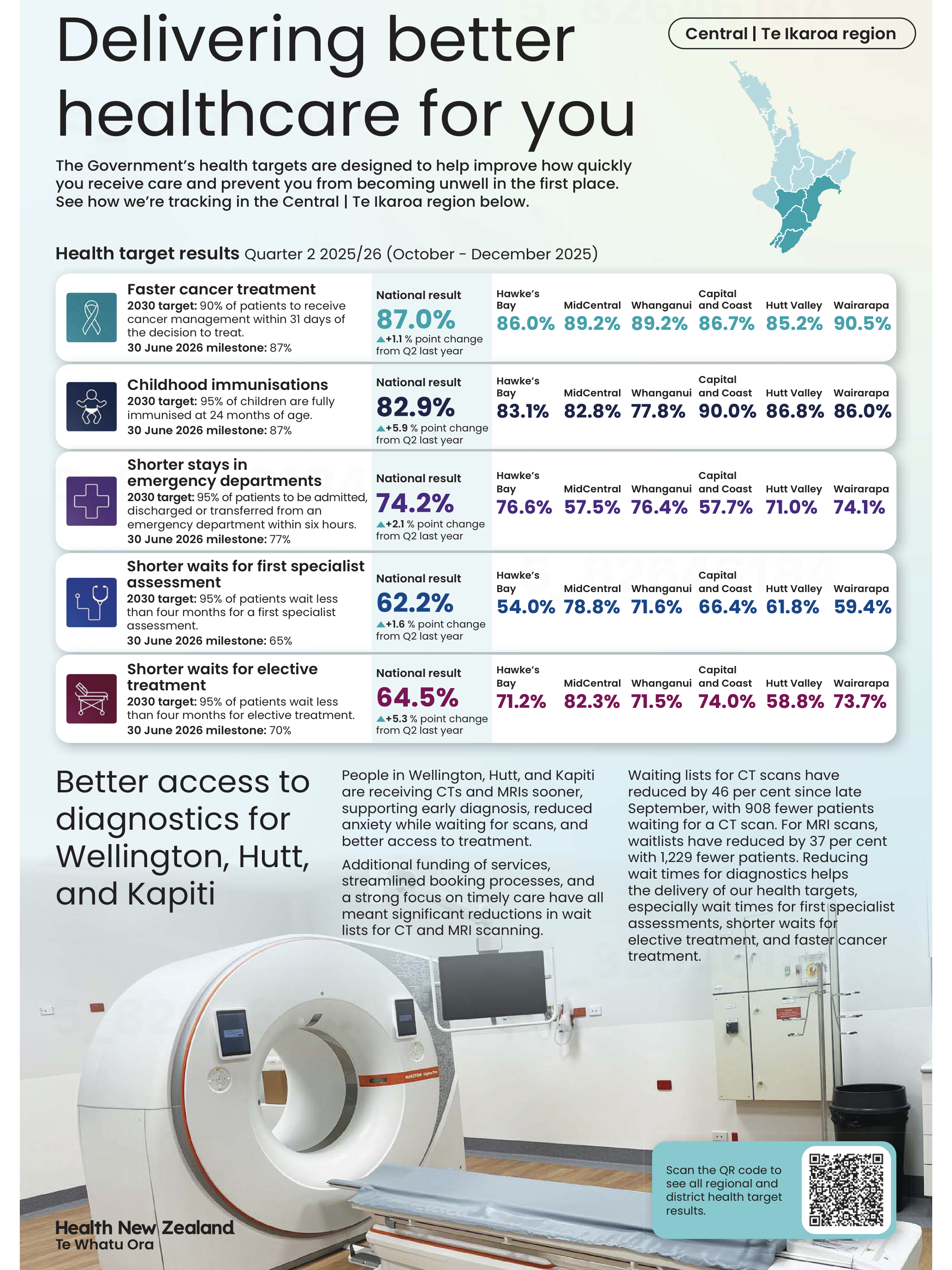
Image reproduced for purposes of education, criticism and commentary.
To the left of those large percentages are 2030 targets and 30 June 2026 milestones for each metric. Comparing the large font national results for the quarter ending in December 2025 to the target for the 30th of June 2026 shows that only one of the five metrics (faster cancer treatment) had reached the June 2026 milestone as of the end of December 2025, while the other four seem unlikely to be able to catch up within six months based on where they were at the end of 2025 and how much they changed in the prior year. In other words, while there has been improvement on all of the metrics between 2024 and 2025, the national milestones set for June 2026 seem unlikely to be met for most of the metrics.
At a local level things are somewhat more complicated. Data is shown for six parts of the lower North Island. None of those areas have reached the June 2026 milestone on one of the metrics (shorter stays in emergency departments), but on another one of the metrics (shorter waits for elective treatment) five of the six areas have already met the June 2026 milestone. Results for other metrics are more mixed.
You need to examine the data closely to see those differences. Use of conditional formatting would have made it much easier to quickly see the big picture. For example, if green font was used for milestones already met, yellow for those likely to be met in time to reach the June 2026 deadline, and red for those unlikely to be met we could easily see the metrics and areas that are on track and those that are lagging behind.
Lesson: Visualisations should leave viewers with an accurate overall impression as well as being accurate in the details.
Don’t drown me in detail
Details like which metrics are on track toward their milestones and which are not help fill in the big picture, but other details can distract from it. A common example, in this and many other data visualisations, is showing numbers to a level of precision that is not meaningful. In this visualisation, numbers could be rounded to the nearest percentage. Showing tenths of a percent clouds the overall picture rather than adding to it since it is unlikely to affect anyone’s perception of how Health New Zealand is doing and even less likely to change any decisions.
Lesson: Report results at a meaningful level of precision.
Someone quickly glancing at this data visualisation in their newspaper might come away with an inaccurate impression of how the health system is performing, so in that sense it is not a good example of data communication overall.
Nonetheless, it’s good that Health New Zealand appears to be making a genuine effort to document their performance for the New Zealand public since the public both uses and pays for the health system. It’s also good that they provided not only a snapshot of where things are now, but included comparative benchmarks and historical data to put current performance into context.
Doing those things while also applying the lessons described would let the audience see how individual data points combine into a larger picture while not drowning them in so much detail that they find it hard to see that larger picture. That would create data communication that is roughly right rather than precisely wrong.
On average, considering variation leads to better decisions
Garrison Keillor describes the people of his fictional town, Lake Wobegon, by saying "All the women are strong, all the men are good-looking, and all the children are above average." While the last claim is impossible and the first two are unlikely, even for a fictional town, the statement illustrates our tendency to focus on aggregate statistics such as totals and averages when we summarise things.
Aggregate statistics are important, but if you only examine overall measures such as those without also checking the extent and nature of underlying variation you may miss important pieces of the puzzle you are trying to put together. That’s particularly the case when what you are describing is less homogeneous than the people of Lake Wobegon.
A recently released report on community engagement done by the New Zealand Transport Agency (NZTA) regarding proposed changes to how State Highway 1 travels through Wellington demonstrates the value of looking into the extent and nature of variation rather than just at aggregate statistics. It does that by breaking down the data a variety of ways using a consistent chart type to make it easy to compare different results to get a clear understanding of the overall situation. Whatever your opinion about the changes proposed for State Highway 1, the report is an example of good data communication.
Aggregate measures sometimes don’t show the full picture
The report summarises results of a survey that asked about five specific changes being considered to the portion of State Highway 1 that runs through Wellington City. Community members who took the opportunity to provide feedback were asked to indicate how they believe the changes overall, and each change individually, would affect them personally and the Wellington region more generally.
Results for each of those two measures for the full set of changes collectively are shown in aggregate in Figure 5-1.
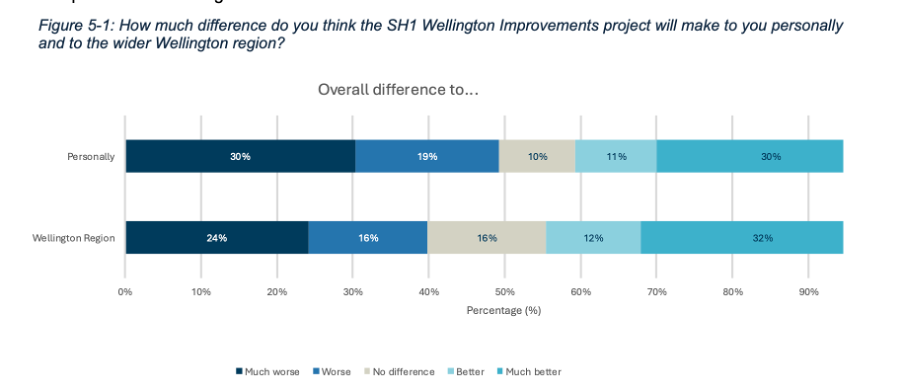
Image reproduced for purposes of education, criticism and commentary.
Importantly though, the report also includes the results for each measure based on where survey participants live, as shown in Figure 5-2 below for how survey respondents think the whole programme of changes would affect them personally.
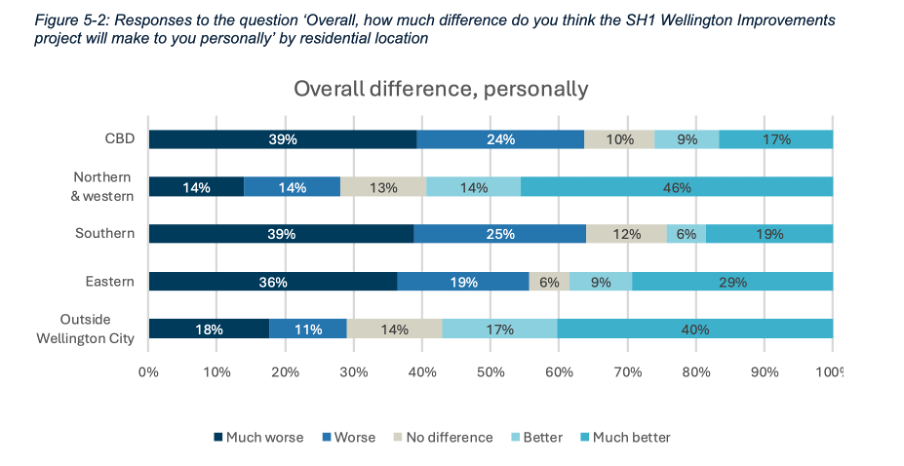
Image reproduced for purposes of education, criticism and commentary.
If we only looked at the first figure we would get a sense that the community is somewhat evenly split on whether the project overall would make things better (41%) or worse (49%) for them personally, but by examining the more granular geographic breakdown of results it becomes clear that the people who believe the changes would make things better disproportionately live outside of Wellington City or in the northern and western suburbs while the people who believe the changes would make things worse for them live in the CBD and the southern and eastern suburbs.
This is important information for policy makers to consider given the changes proposed would occur in the CBD and the southern and eastern suburbs. In other words, the people most likely to be most directly affected by the changes during and after implementation were disproportionately likely to believe the changes would make things worse for them personally.
In this situation a lot of variation in attitudes toward the proposed changes can be explained by where people live, but characteristics such as age, gender, and income, may account for variation in other metrics. It’s always worth checking for such differences rather than just focussing on aggregate measures such as totals and overall averages when using data to make decisions.
Lesson: Aggregated results may hide a lot of variation across different characteristics. Check for such differences, and when they exist show and explain the variation as well as the aggregated results.
Make comparison easy
Previous posts have shown examples of inconsistency in how data insights are communicated. This report shows the benefit of consistency when it comes to choices such as the type of chart, the order of data series, and the colour scheme.
Both Figure 5-1 and 5-2 use stacked bar charts, ordered to show responses from much worse to much better, and with the same colours used to represent each possible response option. Similar charts were used to show perceived personal and Wellington-wide effects toward each change considered. For example, Figure 5-5 below shows how responses varied for each change under consideration.
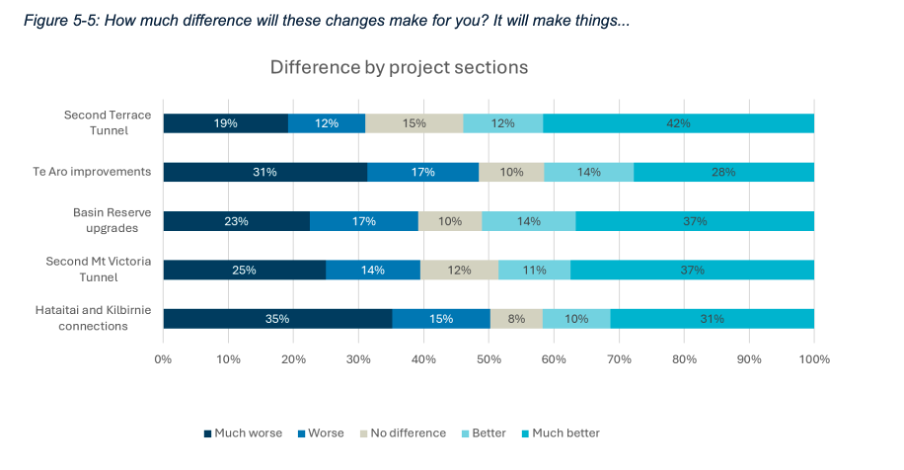
Image reproduced for purposes of education, criticism and commentary.
A stacked bar was a good choice for this data because the response options for each question are mutually exclusive and some labels for different projects and locations are long. Having selected an optimal chart type for the situation, keeping everything else constant makes it very easy to make comparisons between charts as well as within them. It means that someone reading the report can concentrate on how attitudes change depending on where a person lives or what part of the project is being considered rather than forcing them to waste mental bandwidth trying to orient themselves around each new chart because it’s designed slightly differently.
Lesson: Using charts of the same type and with the same order and colour scheme helps facilitate comparisons
Unlike the fictional, reportedly highly homogeneous Lake Wobegon, variation is common in the real world and the data that represents it. Understanding that variation rather than focussing exclusively on aggregate metrics won’t make decisions such as whether to change a state highway easy, but it will, on average, result in better decisions.
Clearly communicating when conclusions may be complicated or contentious
Only five out of the eighty-nine countries and regions included in the World Mortality Dataset had fewer excess deaths than New Zealand over the pandemic period. That might seem unremarkable to people who lived through New Zealand’s lockdowns or to those elsewhere who read about them — except that, indexed across the full period from 2020 to 2023, New Zealand's Covid restrictions were actually less stringent than those of almost every country it is typically compared to, including Sweden, the United Kingdom, Australia, Italy, and the United States. Whether that finding surprises you or confirms what you already suspected, you don't have to take anyone's word for it. The data is right there for you to check yourself — and that is no accident.
It’s part of a recently released series of reports from the New Zealand Royal Commission examining lessons learned about the country’s experience with Covid 19. The pandemic and its aftermath are things that all adults experienced and nearly all have opinions about. It also influenced and was influenced by a complicated web of public health, economic, and legal policies and practices. In situations like this, where the data and related analysis are complex, and many people have strong opinions about, or vested interests in the conclusions, the stakes and potential for a contentious reception are high.
In communicating the results of its investigation into this period of New Zealand’s history to provide lessons to guide responses to pandemics the country may face in the future, the Royal Commission also did two things that provide important lessons for those trying to communicate data-intensive insights in the future.
Divide and conquer
Somewhat unusually, the final outputs from the Commission’s work were delivered in not one, but three reports. The main report is mainly text that systematically lays out conclusions and recommendations about different aspects of the pandemic response. Two separate reports summarise submissions made to the Commission by the public and provide a curated collection of relevant publicly available data.
The one summarising the submissions includes some photos of, and direct quotes from the people who made submissions, showing how the pandemic affected them personally. The data-oriented report includes many charts and graphs showing how New Zealand compared to other countries on a variety of measures and also tracks changes to various measures before, during, and after the pandemic.
The information in those two separate reports inform the conclusions and recommendations in the main report, but each output is hundreds of pages individually, so combining them without removing any content would have created a document of over one thousand pages. Even the most interested parties are unlikely to want to read that.
Faced with a situation like this, it helps to split things up. In some cases that might mean dividing content by topic. For example, in this case maybe separating the health response from the economic response from the legal response. Those things were all inter-twined though, so it makes sense that’s not the option that the authors chose.
Another common way of dealing with this type of problem is to make different reports for different target audiences. In this situation that might have meant one report for policy makers and another for the general public. While that’s often a good solution, the pandemic is a rare situation in that it’s one where anyone reading anything about it is likely to have some direct personal experience with it, and yet there is probably no one who is an expert in all aspects of it. Health professionals don’t understand the nuances of the economic issues that had to be addressed and vice-versa, and everyone, regardless of their professional perspective, also had personal experiences.
Splitting the content the way the Commission did made it easy for politicians and policy makers to focus on the main document to consider possible lessons for the future (and to try to attribute blame for past decisions). It also demonstrated that the Royal Commission listened to and heard the many people who made submissions to it, which is particularly important given how intense, and often sceptical, feelings around the pandemic are. Finally, it allowed people who want to dive into the detailed and comparative data to easily find that. We will look more closely at some of that data ourselves next.
Lesson: If you have a lot of data-intensive information to communicate or you are trying to communicate data-intensive information to multiple audiences with different needs, consider using multiple outputs rather than trying to create one that is intended to be everything for everyone.
Anticipate assumptions, hypotheses and objections
Focusing now on the data-oriented ‘Covid by the Numbers’ supplementary report, we can see another smart decision. That was to make it easy for people to check their own assumptions, hypotheses and objections against the actual data.
People looking at any sort of data-oriented output often have their own views about the phenomena being examined. That’s certainly true of Covid. In some cases the views may be implicit assumptions, but in others they may be explicit hypotheses about how one thing affected another. In this and other situations, we can think about our audience’s assumptions and hypotheses and anticipate objections they might have to insights being presented. I think of these as the ‘yeah, but…’ thoughts that form in people’s minds as they watch a presentation or read a report.
We can leverage our understanding of an audience’s assumptions, hypotheses and objections in constructing data-oriented outputs. The idea is that almost as soon as the ‘yeah, but…’ thought forms in the minds of the viewer or reader the next slide or the next page of the report provides the information needed to answer that question or address that concern.
In the case of Covid, a common type of ‘yeah, but…’ thought is likely to relate to other countries. For example, ‘Yeah, but Sweden didn’t have so many rules, and not that many people died there.’ Or ‘Yeah, but people in the UK were much freer to live their lives.’ The ‘Covid by the Numbers’ supplementary report addresses concerns such as those with a series of charts providing comparative data across many countries and highlighting the exact countries that are most likely to feature in ‘yeah, but…’ thoughts.
For example, Figure 23 shows excess mortality by country (going from least to most excess mortality, and also explaining what excess mortality is in a note at the bottom) and Figure 46 shows the stringency of Covid policies (going from most to least stringent, though it might have been better to always have the most desirable end of the scale at the top). Both use highlighted bars along with arrows and larger labels to make it easy to find comparator countries most likely to feature in ‘yeah, but…’ thoughts and therefore make it easy for readers to test their own assumptions, hypotheses and objections against the actual data.
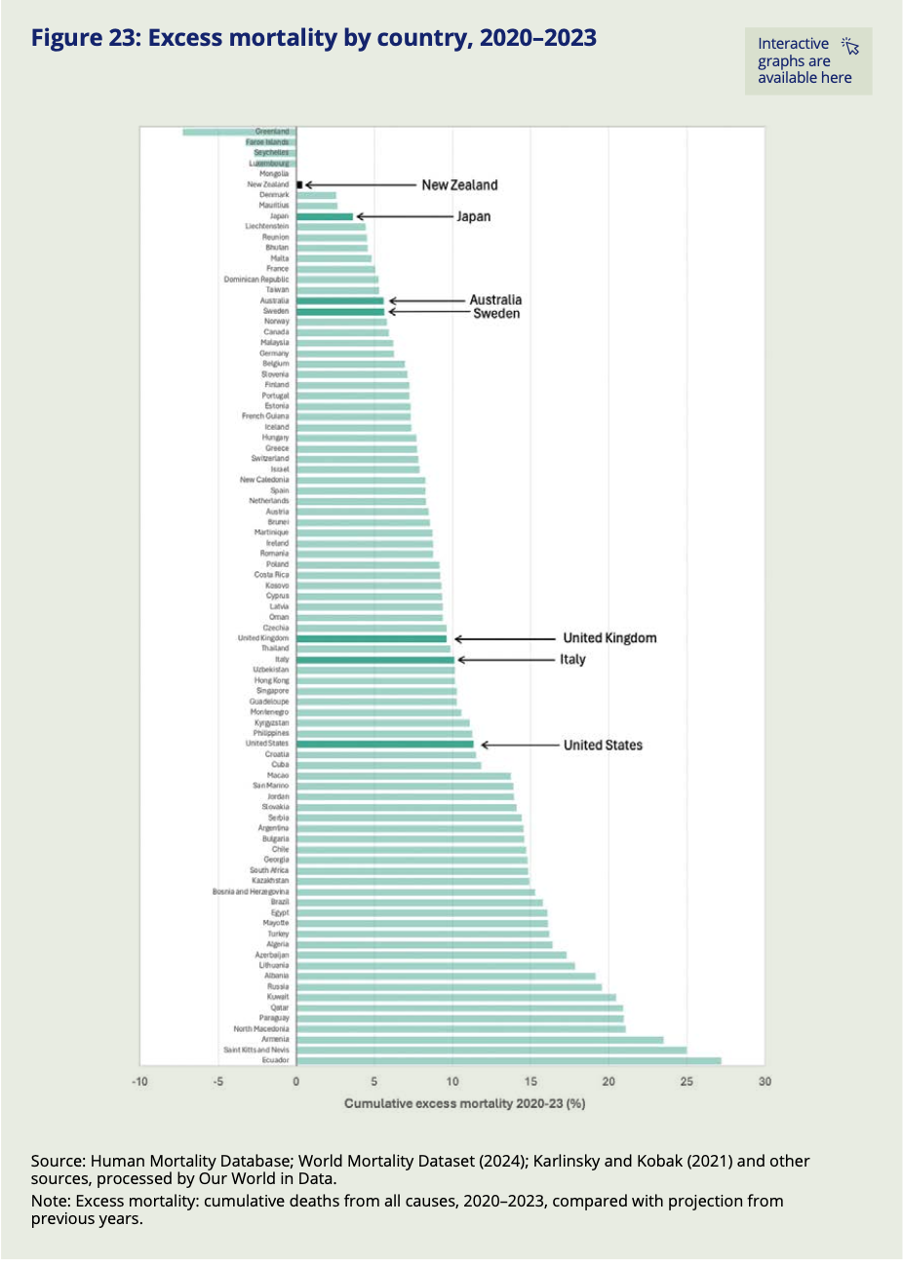
Image reproduced for purposes of education, criticism and commentary.
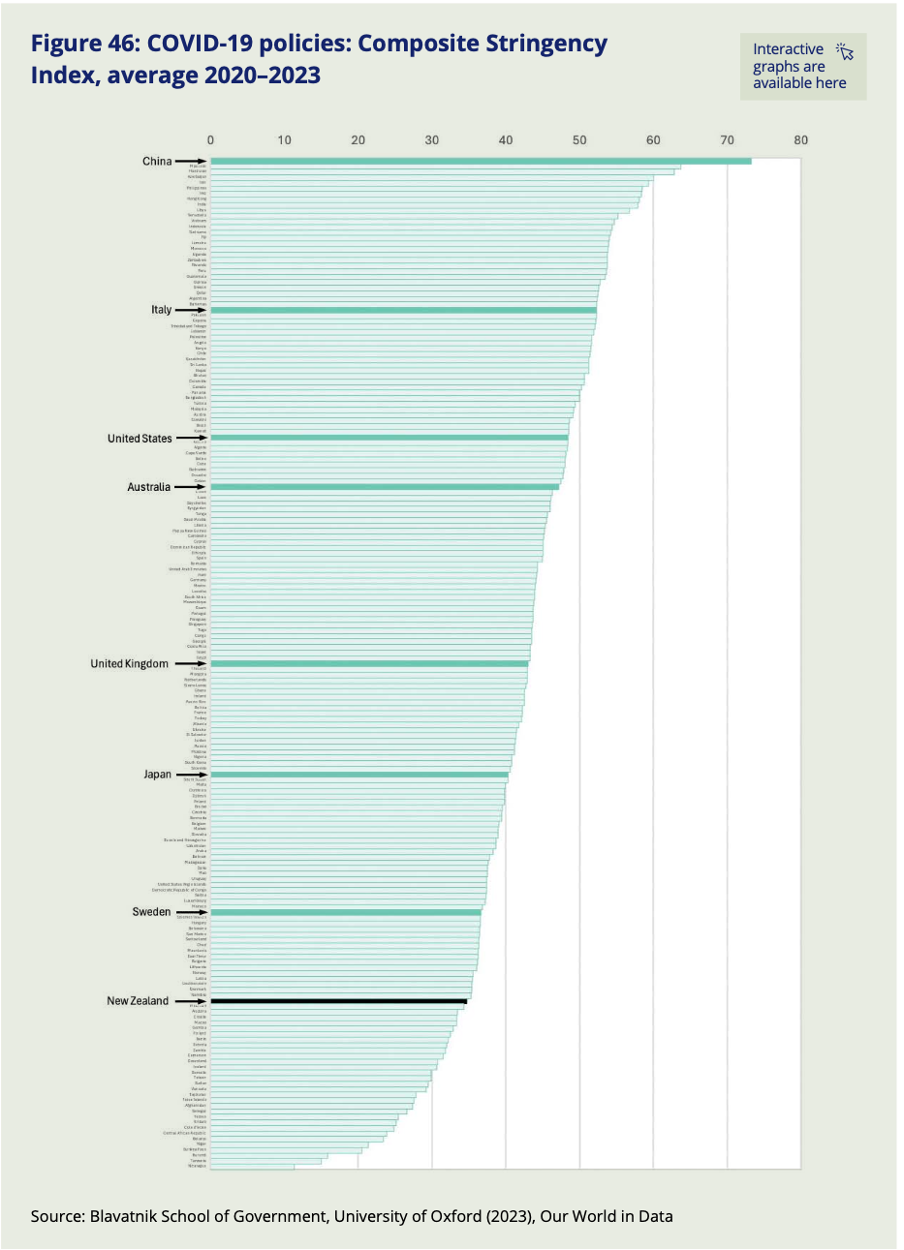
Image reproduced for purposes of education, criticism and commentary.
Lesson: Consider implicit assumptions, explicit hypotheses, or possible objections your audience is likely to have about the data you are trying to communicate and make it easy for them to test their assumptions, hypotheses and objections against the actual data.
Everyone had their own experience of the pandemic, and everyone is likely to have their own reaction to these reports — including to the findings shown in this post. Whether New Zealand's combination of near-best excess mortality and, indexed over the full pandemic period, relatively low policy stringency strikes you as expected, surprising, or still not the whole story, the Commission's choices mean that you are not left arguing from memory or anecdote. The data is there, clearly laid out, and deliberately designed to let you test your assumptions against the evidence. That is exactly what good data communication makes possible — and exactly what we can aim for when we need to communicate clearly about things that are complicated or contentious.
Don’t sacrifice accuracy for attention
"The gender-age divide has tripled since 2011." That bold claim is the title of a data visualisation in this week's Listener. It's the kind of headline figure that grabs the attention of a reader flipping through a magazine in an election year. If that reader is attentive, however, they would realise that it’s a claim that doesn't quite hold up when checked against the chart's own numbers.
The visualisation is part of the cover article of this week’s Listener. It describes New Zealand’s political ‘tribes’ based on analysis of survey data. It includes an interesting discussion of how the political views of voters have changed over time.
Unfortunately, the article includes a data visualisation that contains two critical flaws as well as one more minor one.
Make sure your visualisations, titles, and text-based descriptions all match
The data visualisation shows where women under 40 and men over 40 place themselves on a 0-10 scale where 5 is politically centrist, numbers below 5 get increasingly left-leaning as you go toward zero and numbers above 5 get increasingly right-leaning as you go toward 10.
As previously mentioned, the title of the visualisation in question is ‘the gender-age divide has tripled since 2011.’ In 2011 the chart shows the value for men over 40 being 5.6 and for women under 40 being 5.1. As the chart shows, that is a gap of .5, so to triple the difference in 2023 the gap would need to be 1.5 (.5*3), but it is actually 1.3. It’s possible that the difference is due to rounding of the values, but the title of the chart not matching the data in the chart is a problem.
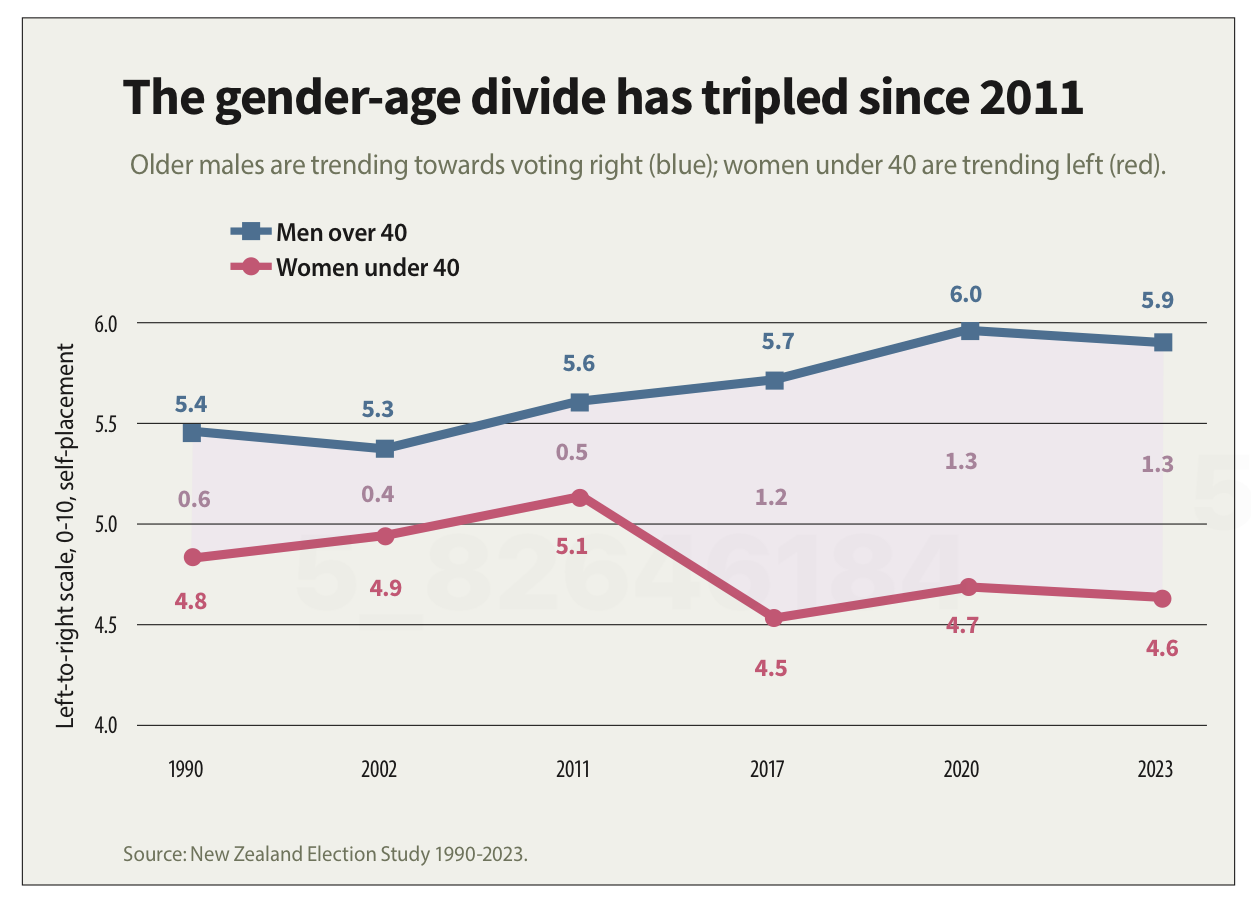
Image reproduced for purposes of education, criticism and commentary.
If someone quickly does the maths and realises that the claim of tripling is over-stated, they may wonder about the veracity of other aspects of the visualisation, the article, or the underlying research. If a difference such as the one just described is due to rounding, that could be addressed by changing the chart title, showing the values to one more decimal point or adding a rounding disclaimer. If the gap has not actually tripled, the title should not say that it has.
Lesson: Chart titles and text-based descriptions of data should match results shown in visualisations
Don’t truncate axes
The second major issue undermining the credibility of this visualisation is the axis, which shows values ranging from 4 to 6. Remembering that the scale went from 0-10 and was centred on 5, what that means is that the portion of the scale shown goes from a little bit left-leaning to a little bit right-leaning. While it’s clear from the visualisation that there is a difference between the two groups and that it has grown over time, in the context of the whole scale the gap is still not that large.
Because only the middle portion of the 11-point scale is shown on the axis, it makes the gap appear to be much larger and more meaningful than it actually is. The impulse to do that may be to make it seem more newsworthy or to help viewers see how the gap has evolved over time, but either way it does not help the viewers understand the data in its full context.
Any time only a portion of an axis is shown as it is here it tends to have the effect of magnifying differences, trends, etc. and to the extent it does that it misrepresents the data even if all of the numbers shown are accurate.
Lesson: Using a truncated axis makes trends, differences, etc. appear larger than they actually are.
State your metrics
Obviously not all women under 40 or all men over 40 place themselves in the exact same place on a political scale, so the visualisation is almost certainly showing the mean value for each group (as opposed to the median, which is the other most common way of representing what’s typical for a group, but in this situation could only produce values ending in 0 or 5 after the decimal point). It should explicitly specify that it’s showing the mean (assuming that’s what it is), but it does not.
We can make an educated guess in this context, which is why this is a less critical issue than the other two, but we shouldn’t have to guess. Clearly stating your metrics lets viewers focus on what the data means, not what it is, and avoids confusion and misunderstanding.
Lesson: Viewers should not have to guess what the values you are showing in a visualisation are — state that explicitly
The political gender-age gap widening over the past couple of decades is genuinely interesting, and could be consequential in the upcoming election, so it doesn't need to be overstated to earn attention. When the numbers in a chart don't support the headline above it or the chart seems to exaggerate results, readers who notice may question not just the visualisation but the research behind it. That's a high price to pay to try to make a title or headline a bit catchier or to make the data in a graph seem more dramatic.
What the screen industry can teach data communicators
People in the screen sector excel at telling stories, and a report about the New Zealand screen sector provides an opportunity to consider how we tell stories with and about data. The report provides an interesting overview of the sector, but also illustrates some common ways in which the use of charts is not quite as effective as it could be.
The film director David Fincher is quoted as saying: "My idea of professionalism is probably a lot of people's idea of obsessive." Attention to detail can elevate a data communication from serviceable to excellent just as it can elevate a film or a TV show.
Consider the metric you’re using when creating stacked bar and column charts
Figures 3 and 6 of the report focus on how the New Zealand screen sector breaks down into sub-sectors such as production and post-production. It does this based on a count of firms in Figure 3 and a count of people in Figure 6. That’s interesting and important information, but it’s shown in a way that makes it harder to digest than it needs to be.
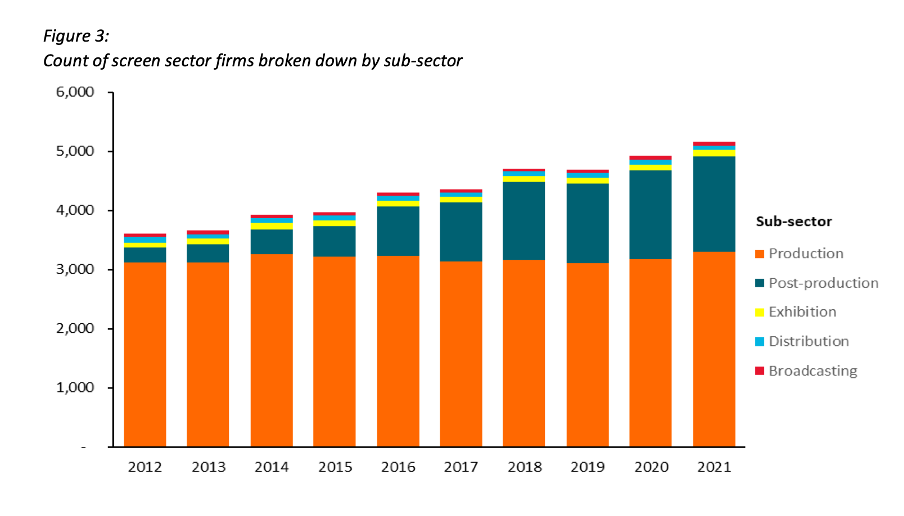
Image reproduced for purposes of education, criticism and commentary.
Because both figures show the data as counts, or absolute values, rather than as percentages, it’s somewhat hard to discern to what extent a particular sub-sector is growing because that can be masked by growth in the sector overall. For example, looking at Figure 3 we can reasonably conclude that, when it comes to firms, the production sub-sector is shrinking as a percentage of the overall sector and post-production is growing because the orange portion of each column has stayed around the same height while the columns have grown overall and the dark teal portion appears to have grown as a percentage of the columns.
Beyond that though we don’t have a very good idea of the magnitude of the shift in those percentages, and we have even less idea of whether there have been any changes in the proportions of the smaller sub-sectors since those are represented by relatively small slices of relatively tall columns.
When using stacked columns or stacked bars, the story being told will generally be more clear if the data is shown as percentages rather than as counts or absolute values. That makes it easy to scan horizontally (for stacked columns) or vertically (for stacked bars) to see differences. For example, while not perfect for other reasons we will touch on shortly, Figure 19 of the same report uses stacked columns showing percentages to illustrate the breakdown of sub-sectors by region and from that we can easily see that people working in post-production are concentrated primarily in Wellington, whereas production represents a large proportion of people working in the screen sector in all regions.
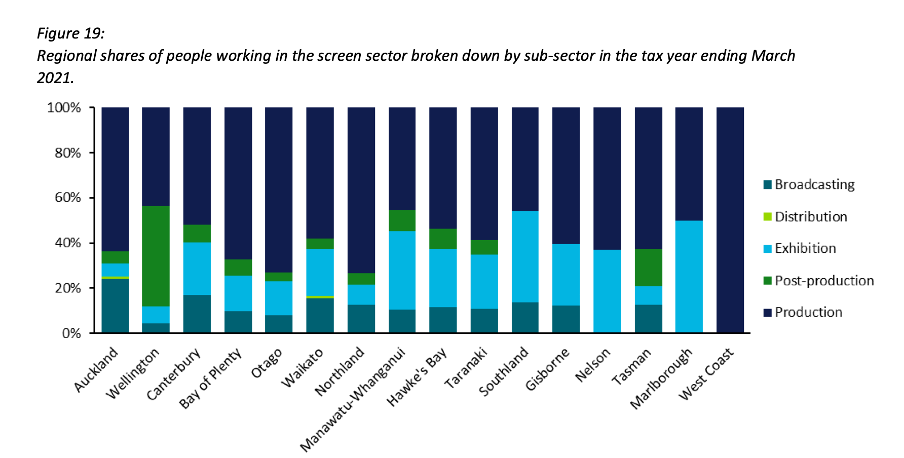
Image reproduced for purposes of education, criticism and commentary.
Lesson: Stacked column (and bar) charts usually work best when they show percentages rather than absolute values
Continuity
While Figure 19 is good in the sense that it represents the data as percentages rather than counts or absolute values it’s not as good as it could be in that the colours used to represent the different sub-sectors have changed from what they were earlier in the report, such as in Figure 3. That is a common problem in data communication, as we’ve seen in earlier posts. It can occur when different people work on the same output or even if the same person works on it at different times. It often occurs because people rely on software defaults, which are a function of the order the data is in and sometimes the particular theme or template a person has on their computer.
No matter how or why this shift in colour assignment happens it’s as disruptive as it would be if the colours of the costumes the characters in a TV show or movie you were watching changed part way through for no apparent reason. In our data communication, as in film or TV production, we should take care to avoid that.
That maintenance of consistency is called continuity in the screen industry. For example, besides noticing if a costume has changed colour from one scene to the next without explanation we would also be likely to notice if an object is in a different place. Similarly, in data communication the idea of continuity applies to order as well as colour. Once we have established a particular order for something, such as the sub-sectors in this report, maintaining it makes it easier for viewers to understand what they are looking at in a given chart and to make comparisons across charts.
For example, like Figure 3, Figure 6 shows the breakdown of sub-sectors, but this time by workers rather than by firms. It’s interesting to compare and contrast the two, but if you visually scan back and forth between Figures 3 and 6 you can see it’s not that easy to do. Part of that is because both use counts rather than percentages, as described previously, but it’s also because the order of the sub-sectors has changed. Maintaining continuity when it comes to the order of the sub-sectors across both charts would have improved the experience of the viewer.
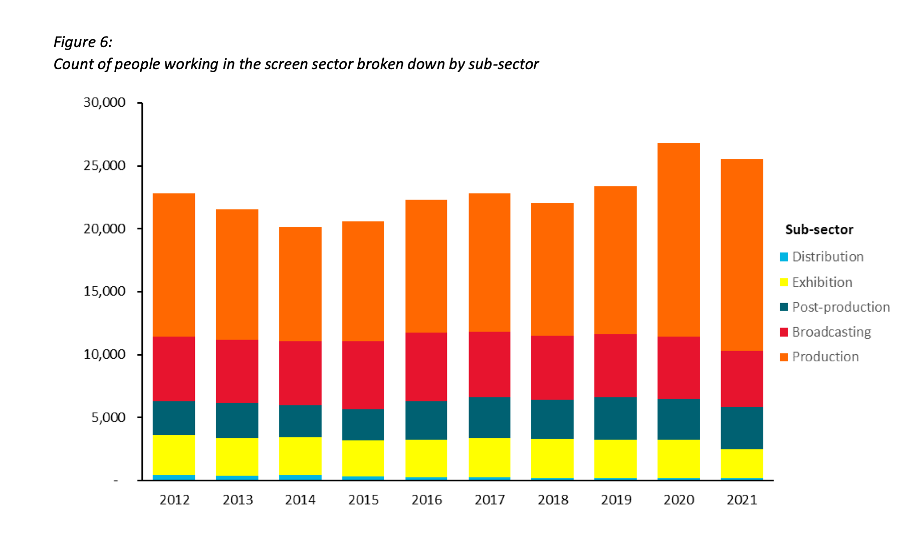
Image reproduced for purposes of education, criticism and commentary.
Lesson: Once you’ve established a colour scheme or an order in which to show different groups, categories, etc., maintain it unless there is a very good reason not to
Two (or more) charts are often better than one
Just as filmmakers use different scenes to show us different insights into characters, we can use different charts to show different insights derived from data. The stacked column charts shown in the current versions of Figures 3 and 6 each show two different insights: 1) total growth in firms or people working in the New Zealand screen industry, and 2) changes to the proportional breakdown of firms or people by sub-sector.
There are many similar situations in data communication. For example, we might want to show how the number of customers or clients has changed and how that breaks down by region, age, income, etc.
In all of those situations it generally works better to use a chart with solid bars or columns first to show the change in the absolute value or count of whatever we are focussed on and then follow that up with a stacked bar or column chart showing the proportional breakdown than to try to do both at once as happens in the current versions of Figures 3 and 6. The first chart establishes the overall change and then the second one shows whether that is being driven disproportionately by particular sub-groups. Additional stacked bar or column charts can be used to show additional breakdowns.
Lesson: If you are trying to communicate multiple insights consider using multiple charts
Those of us trying to communicate data-driven insights are like filmmakers and TV producers in that we are trying to create an engaging narrative. We can learn from them in taking care to ensure the story we tell is clear, maintains continuity when it comes to things such as colour and order, and is not unnecessarily complicated to follow. We should carefully attend to those details because in data communication, as in filmmaking, Fincher's 'obsessiveness' is really true professionalism.
Discussion and visualisation of data should make an issue more understandable
Housing is a fraught topic in New Zealand, as it is in many places. Too many people lack access to a decent place to live at a price they can afford. On the other hand, people who have lived in neighbourhoods they love for decades may be reluctant to see them change through intensification. That is a hard problem, and one that’s helpful to consider in light of good available data.
An article in the most recent edition of The Sunday Star-Times missed an opportunity to do that. The article describes results of a survey conducted by Freshwater Strategy on behalf of The Sunday Star-Times. The survey measured attitudes of eligible voters toward new housing and increased housing density. Ideally the survey results would have helped to inform the debate around these issues, but the results were communicated poorly, reducing their ability to make a constructive contribution to the debate.
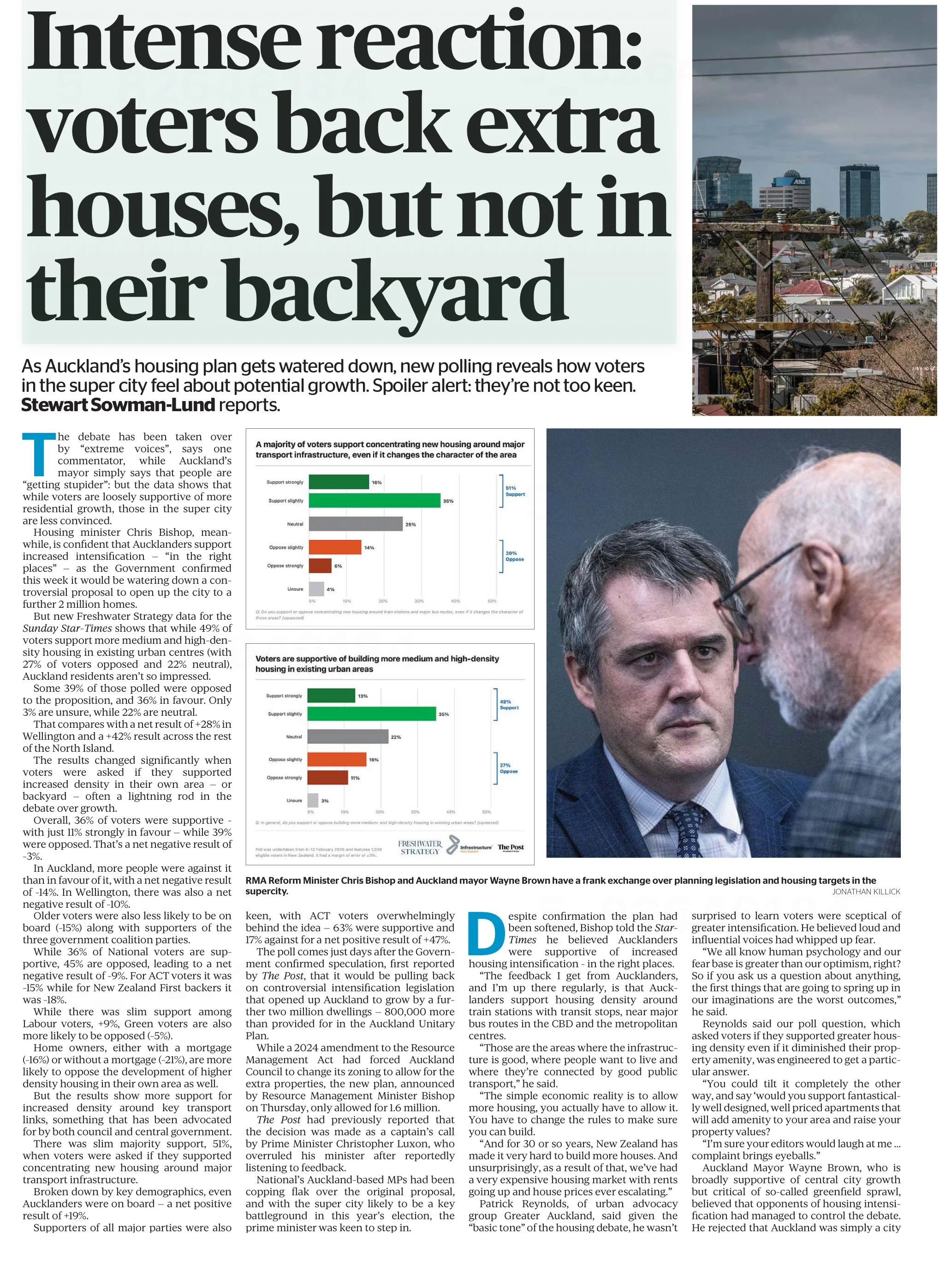
Reproduced from page 6 of the Sunday Star-Times from 22 Feb, 2026 for purposes of education, commentary, and criticism.
Show the things that are most important for the audience to know
One data communication choice in the article that limits its likely use and usefulness relates to which results were featured in visualisations and which were not. The headline of the article says that ‘voters back extra houses, but not in their backyard’ and the text of the article describes density in people’s own local area as ‘often a lightning rod in the debate over growth’. Given those things, it’s surprising to see that even though the text of the article discusses attitudes toward increased density in survey respondents’ own local areas, those results don’t feature in either of the two charts shown in the article. The two charts that are shown illustrate fairly similar responses to fairly similar questions (about increased housing intensification around transport infrastructure and in existing urban areas, which in practice are often likely to be the same places).
Lesson: When using a combination of text and visualisations to communicate insights from data, the data visualisations should be used to illustrate the most important points.
Show (and tell) your audience about your results at a level of granularity required to inform their decision making
A second problem with the way the data from the survey is communicated in the article is that the charts that are shown present more granular results than the text descriptions that accompany them. That makes it difficult to understand the results in detail – particularly for the crucial question for which there is no visualisation.
That is problematic because for emotive issues such as housing there is a big difference between being strongly supportive versus slightly supportive or being strongly opposed versus slightly opposed. Those who are strongly supportive or opposed are much more likely to take actions such as contacting their elected representatives, signing petitions, participating in consultation processes, and sharing their views formally or informally. Their votes are also more likely to be influenced by the issue.
Showing more granular results with all six possible responses to each question would have made it easier to see the differences in attitudes when increased density is discussed in the abstract versus in a way that could have an immediate effect on the people expressing the attitudes. Obviously data communication almost always involves choices about what to include and what to exclude or present in an aggregated manner, but in this case a relatively small change in the type of chart used would have enabled much more information to have been communicated to help readers understand the issue being discussed.
Both of the charts shown are bar charts, with each bar representing the proportion of survey respondents who gave each response to the question shown at the bottom of the chart. Because they are mutually exclusive proportions (each person can give only one answer to each question, and all respondents are represented if only to say they are neutral or unsure) then these results could have been shown using a stacked bar chart. That is where there is a bar sliced into segments – in this case based on which response people selected for each question. One stacked bar chart with three bars could have been used to compare overall results for the three questions discussed in the article.
The text of the article also discusses variation in responses to all three questions based on location, age, voting preferences, and home ownership. There are no charts for any of those things, which makes it somewhat difficult to follow the text-based discussion about how results vary by group. Additional stacked bar charts would have helped to show key differences based on location, age, voting preferences, and home ownership.
Lesson: When possible – and especially when details are important to truly understanding an issue – try to preserve granularity when communicating data and only aggregate when doing so helps the viewer understand the data more clearly.
Define your metrics
Given the previously described issues with what was shown in visualisations, the text of the article had to carry most of the burden of communicating the survey results; however many readers would probably struggle to fully understand the text-based descriptions. To see why, let’s take a look at an excerpt from the text of the article.
“… while 49% of voters support more medium and high-density housing in existing urban centres (with 27% of voters opposed and 22% neutral), Auckland residents aren't so impressed.
Some 39% of those polled were opposed to the proposition, and 36% in favour. Only 3% are unsure, while 22% are neutral. That compares with a net result of +28% in Wellington and a +42% result across the rest of the North Island.”
The last sentence in the excerpt shown discusses ‘net results’ of +28% in Wellington and +42% across the rest of the North Island. The subsequent discussion also uses the ‘net’ terminology. People who regularly review survey data are likely to know that ‘net results’ in this context mean the total percentage in support (slightly + strongly) minus the total percentage in opposition (slightly + strongly); however the article does not say that anywhere and it seems unlikely that most readers of the Sunday Star-Times are familiar with that convention. Calculated metrics like that should be explained when viewers may be unfamiliar with them.
Lesson: If you are using a calculated metric, you should explain how it’s calculated if more than a very small percentage of the target audience are unlikely to know that.
Between the most salient question not being shown in a chart or described in full, group differences not being shown in charts or described in full, and many people not understanding the concept of net results in this context I suspect this article may leave many readers no better informed than they were before they read it. That is a lost opportunity for data to play an important role in helping people understand and make decisions about this important issue for our society. A detailed understanding of how attitudes vary by group and by form of intensification is likely to be necessary for finding housing solutions with enough community support to be implemented, and for identifying the specific challenges that must be overcome to make that happen.
Consistency is helpful to those viewing data visualisations
Famous quotes such as: “A foolish consistency is the hobgoblin of little minds” by Ralph Waldo Emerson and Oscar Wilde's "Consistency is the last refuge of the unimaginative" give the concept of consistency a bad name. Like most things though, consistency has its place, and one of them is in data visualisations.
Ideally, the structural elements of a data visualisation should fade into the background to enable viewers to take away the key insights without having to spend a lot of time orienting themselves. Consistency in the use of axes, colour, and chart types can help achieve that. Let’s see how by looking at some examples from a report on the literacy and numeracy skills of New Zealand adults produced by the Ministry of Education.
The report has inconsistencies in the use of axes, colour, and chart types. Resolving those would turn an accurate but clunky data communication into a better, more polished one.
Axis consistency
The main focus of the report is on the literacy and numeracy skills of adults in New Zealand as measured through surveys conducted in 2014 and 2023. The report goes into a lot of detail about the response rate being much lower in 2023 than in 2014, resulting in the need to exercise caution when interpreting and comparing results; however we will focus on how the results are shown rather than how they were derived.
Possible scores on the numeracy and literacy tests that are the focus of the report can vary between 0 and 500 with higher numbers meaning greater literacy or numeracy. Eight different visualisations within the report show results based on those scales, yet none of them show the full 0 to 500 range. The ranges that are actually used vary. Figures 1, 4, 5, 7, 17 and 18 use 180 to 300 whereas Figure 2 uses 150 to 350 and Figure 6 uses 170 to 310. This makes it difficult for users to intuitively grasp the magnitude of differences being described without looking carefully at the axis value labels.
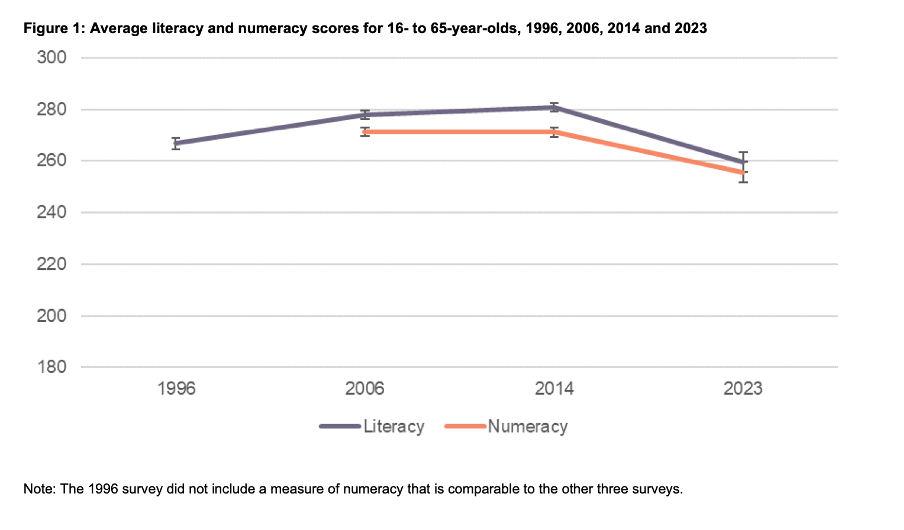
Image reproduced for purposes of education, criticism and commentary.
In a situation like this, it's generally better to show the full range of possible values for a metric. That eliminates the problem of inconsistency across visualisations (within and across outputs) and also results in more accurate intuitive interpretation of the magnitude of differences.
Lesson: When showing the same metric across multiple charts to the same audience (whether in a single output or multiple outputs) the range of the axes should remain constant.
Colour consistency
Another aspect of the design of the visualisations in this report that viewers would need to attend to before focussing on the survey results or their implications is the use of colours. The charts showing the test scores all use two colours – purple and orange; however what is purple and what is orange varies. In Figure 1, literacy is purple and numeracy is orange, but in Figures 2, 5, 7, 17 and 18 the year 2014 is purple and 2023 is orange. In Figures 4 and 6 males are purple and females are orange.
Many organisations have style guides that stipulate the use of particular colours, and that’s likely to have influenced this choice, but using the same colours for different things at best results in viewers needing a little bit more time to digest each chart and at worst can result in confusion or misunderstanding. There are multiple ways to avoid that, even staying within a restricted colour palette.
First, small changes to some of the charts would mean that literacy could always be purple and numeracy could always be orange. In Figure 2 making the marker in the second box (literacy 2023) purple and the marker in the third box (numeracy 2014) orange would maintain the colour convention established in Figure 1: literacy purple, numeracy orange. In Figure 4 consistency could be achieved by changing the structure so the columns show literacy type by gender by year instead of gender by year by literacy type. Alternatively different colours (besides just purple and orange) could be used to designate different things. Even fairly strict style guides typically include more than two colours, and use of different shades and patterns are options for stretching a limited colour palette further.
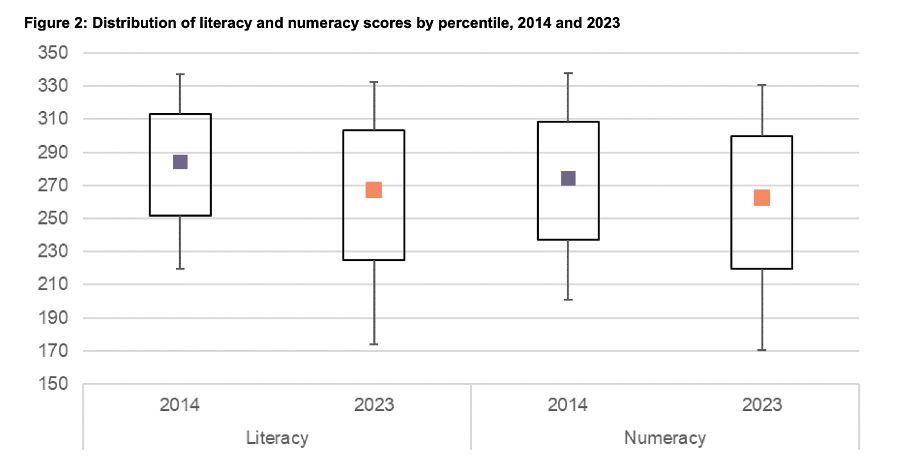
Image reproduced for purposes of education, criticism and commentary.
Lesson: When using colour to designate different groups, try to make colour assignments consistent.
Chart type consistency
Even though Figures 1, 2 and 4 all show literacy and numeracy scores, they do so using three different chart types. There is no reason for that, and as with the different colours at best it results in viewers needing a little bit more time to comprehend each chart and at worst it can result in confusion or misunderstanding.
In a situation like this when trying to show overall results for a particular metric and then how it varies based on different characteristics it can be helpful to use the same chart type, and gradually build it out or show versions that vary only on those different characteristics that you want to highlight. That makes it easy for viewers to understand what is being communicated and to see where the key differences are.
For example, this report could have started with the data communicated via box and whisker charts as it is shown in Figure 2, but with the colour changes and axis adjustments described previously and then used subsequent charts with the same structure but broken down by characteristics such as gender, age, educational attainment, and time in New Zealand.
Or, depending on the intended target audience, column charts showing averages could be used, such as a modified version of Figure 4, for all of the charts. Either of those options would enable the viewer to orient themselves to the structure of the chart once and from then on focus on changes resulting from showing the same data for different years and groups.
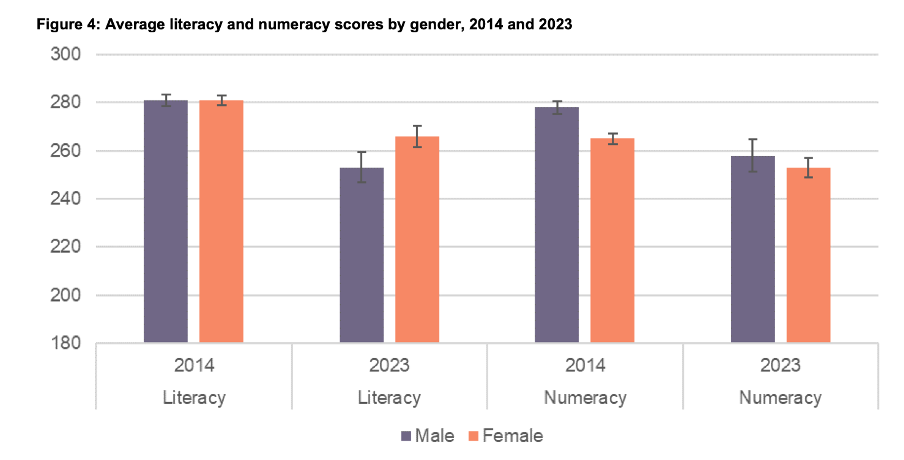
Image reproduced for purposes of education, criticism and commentary.
Since either of those chart types could work for showing the data consistently, the choice between them would come down to the intended target audience. Box and whisker charts would work well if the intended target audience is highly numerate themselves. That’s because the ability to interpret charts is part of the measurement of numeracy. Box and whisker charts contain more information than column charts in that they are a compact way of showing the median (marker in the middle) as well as the 10th (bottom whisker), 25th (bottom of the box), 75th (top of the box), and 90th (top whisker) percentiles. All of that information presented in a compact display would be appreciated by people who are highly numerate, but may confuse those who are less so. Column charts convey less information (in this example only an average), but are easier for a target audience that is less numerate to interpret.
Lesson: When telling a story about if or how a given metric varies based on characteristics such as demographics it's helpful to keep the chart type consistent so that people can focus on just how the focal metric changes depending on the characteristics that are changing.
Once all of the analysis has been completed for a big piece of work, it’s tempting to try to get the results out as soon as possible in a ‘good enough’ format, but spending just a bit of extra time on things like consistency can help ensure that all of that analytical work can be clearly understood and actioned. That work to improve the experience of the audience is not unimaginative. It’s sensible and considerate.
Tables may not be flashy, but they’re often very useful
When faced with data-intensive insights to communicate, common mistakes are to go for a cool new type of chart you’ve recently seen, to include a variety of different visualisations to ‘mix things up’, or to rely too heavily on a single type of visualisation.
It’s helpful to think of the best way to communicate insights derived from data the same way a tradesperson might think about their tools, and select the right one for the job at hand. While they may not be the flashiest tool in the data toolbox, tables are often a good visualisation option, and can be the best one.
This example from Tourism New Zealand helps illustrate why that’s the case. The table shows data related to international visitors' arrivals in New Zealand. It is part of an interactive online dashboard and includes many more countries and territories than can be seen in this screenshot (237 in total). Data for the other countries is visible if you view the data online and scroll or download it.
Screenshot from Tourism New Zealand’s International Visitor Arrivals dashboard accessed February 2026. Image reproduced for purposes of education, criticism and commentary.
This is good data communication because it aligns the visualisation type with audience needs.
Why tables work well when audience interests vary, and there are a lot of possible ways of aggregating and showing the data
If the target audience was only interested in the total number of visitor arrivals, that could easily be shown with a different chart type, such as a line chart showing arrivals over time; however it’s easy to imagine many reasons why people might want to be able to see the disaggregated data for specific countries. Something like a line chart, scatter plot, or bubble chart showing each country or territory individually would be far too cluttered and make it hard to discern precise values for specific countries.
Showing the data in this table format makes it possible for viewers to easily see the data for the countries that are of interest to them. That might vary depending on whether the user is a government policy analyst, someone working for an airline, the owner of a specific tourism-focussed business, etc.
Lesson: Consider what type of data communication will create the best user experience. When there are many possible cuts of the data and different audience members are interested in different aspects, tables often work better than charts.
Smart design choices reduce cognitive load
Good tables aren’t just about showing numbers in rows and columns. Notice the conditional formatting in this example: green shading shows year-over-year increases, with darker shades indicating larger gains. Australia’s substantial 148,116 increase appears in the darkest green. Red text flags decreases, such as the drop in visitor numbers from India and Fiji.
This formatting follows data visualisation conventions that most viewers intuitively understand: red typically signals decreases or concerning values, green indicates increases or positive values, and darker shades represent greater magnitude. These conventions reduce cognitive load - users don’t need to learn a new visual language for each dataset but can instead focus on the insights revealed from the data. Such formatting also lets users quickly spot patterns and outliers without needing to manually compare numbers across rows.
While it’s not obvious from the screenshot, clicking on the titles of any of the columns in the table enables you to sort on that metric and the dots in the upper right corner lead to more options, including filtering. Those features enable users to see the data in the way that’s most helpful for them with minimal effort. For example, a capacity analyst at an airline might want to sort the data as they are by number of arrivals. In contrast, a policy analyst documenting the effectiveness of covid recovery policies might sort on the final column or someone with a tourism business focussing on visitors from just a few countries could filter the data to show only those countries.
Lesson: Good design reduces the work viewers must do. Features like conditional formatting should help users spot patterns instantly, while sorting and filtering capabilities let users organise data for their specific questions rather than forcing them to search through irrelevant information.
When tables work - and when they don’t
For all their strengths in an interactive dashboard context like this one, tables are normally much less effective in a presentation setting. Imagine projecting this table in a conference room. The font would be too small to read if you showed all countries at once. If you enlarged the font and spread the data across multiple slides, audiences couldn’t easily find the countries of greatest interest to them unless the countries were arranged in alphabetical order. But alphabetical ordering would obscure the patterns revealed by metric-based sorting. The difference comes down to how people interact with the data. Dashboard users can sort, filter, scroll, and spend time with individual data points that matter to them. Presentation audiences are passive viewers who see whatever the presenter shows them, in whatever order, for however long the slide stays on screen. Different contexts demand different approaches.
If the data had to be communicated in a presentation, it would be better to focus on the more aggregated data and the overall trends and patterns in that, and then distribute a detailed table via something like a handout or a link. A link would make it possible to offer the types of interactivity described previously, but even in a handout the data could be shown in different orders (e.g., alphabetical, greatest to fewest arrivals, greatest year on year change, etc.) to aid usability.
Lesson: Context determines effectiveness. The same data often requires different visualisations for different viewing situations. Design for how and where your audience will actually view the data.
Choose the right tool for the job
As will be discussed in subsequent posts, there are many things that can be done to polish data visualisations and other communications, but the starting point should be choosing the right type of data visualisation for the audience, the data, and the delivery context. Tables may not be the flashiest choice, but there are many situations where they are the right tool for the job.
Reducing greenhouse gas emissions is hard. So is counting and showing them.
One popular part of the data-related courses I teach through Wellington Uni Professional involves participants critiquing various forms of data communication created by others. The idea is that it's easier to spot things that are confusing, misleading, inaccurate, or just could be better when they were made by other people because we're all too close to our own work and know what we mean even if that's not what comes across to others.
I thought I would share some publicly available examples of data communication and visualisation and comment on what works, what doesn't, and what's okay but could be improved. The idea isn't to disparage the people or organisations that have produced less than ideal data communications – we've all done that – but rather to show how hard it is to craft truly effective data communication, and to share some lessons and tips toward that end.
Let's examine this chart from Danyl McLauchlan's thoughtful column in this week's Listener to see what broader lessons we can draw about effective data communication. I want to start by pointing out that the chart has little to do with the points being made in the column itself.

The chart appears in 'Increasingly common tragedy' by Danyl McLauchlan on page 11 of the Listener, February 7, 2026. Image reproduced for purposes of education, criticism and commentary.
A quick glance at the chart would lead you to believe that the column is about what sources contribute most to New Zealand's greenhouse gas emissions; however that is only touched on briefly in the text. Mainly, the column offers a game-theoretic explanation for the collective failure of the country and the world to reduce emissions sufficiently to avoid the types of weather extremes we are already starting to experience, comments on New Zealand's lack of resilience in the face of those extremes, and discusses the benefits clean energy offers above and beyond its contribution to reducing emissions. Someone just flipping through the magazine might look at the chart and take away the message that climate is really just a problem for farmers, which is not the point of the column. This data visualisation detracts from the important, but nuanced, arguments being made rather than helping to communicate them clearly.
Lesson: Data visualisations are not decorations. They should only be used when they help enhance viewers' understanding of the topic being discussed.
Besides not being particularly relevant to the text of the article, the data shown in the chart is unlikely to be clearly understood by the audience – in this case readers of the Listener. The data comes from The Ministry for the Environment. It is based on measurement standards developed as part of international agreements. Climate professionals would be familiar with those standards, but the average reader of the Listener is unlikely to be.
That's a crucial difference because data communication created for subject matter experts should be different from data communication created for the general public. In this case, a couple important things that climate experts know, but most of the magazine reading public does not are that: 1) Greenhouse gas emissions can be measured on either a production or consumption basis, and 2) The standard way of reporting greenhouse gas emissions excludes international travel and transport.
The data in the chart shows greenhouse gas emissions generated by source in the goods and services New Zealand produces (not consumes). That makes even that first, dramatic, bar hard to interpret because New Zealand exports a lot of animal products. That first bar being the longest doesn't tell us if livestock is farmed more or less efficiently in terms of greenhouse gas emissions in New Zealand than elsewhere. We also can't tell if farming is more or less efficient in terms of greenhouse gas emissions than other industries because we have no information about the outputs associated with the emissions.
With regard to the second point, a reader unfamiliar with the fact that international travel and transport are not included in the data shown might reasonably conclude that their twice yearly international trips are not a problem given domestic aviation is at the bottom of the chart and international aviation does not appear at all. Yet if such a reader were to calculate his or her personal consumption-based emissions and include all sources, they might be surprised to discover that those international flights are likely to be their greatest personal source of greenhouse gas emissions.
Lesson: Data communications should be tailored to the intended target audience.
These two principles of using visualisations purposefully rather than decoratively, and tailoring them to the intended target audience can make the difference between data communication that clarifies and data communication that confuses. In future posts, I'll explore more examples of what works, what doesn't, and what could be better with some thoughtful improvements.